October 26, 2026 · Bella Virtual Staging
Best AI Tools to Remove Furniture From a Photo: 12 Apps for Realtors (2026)
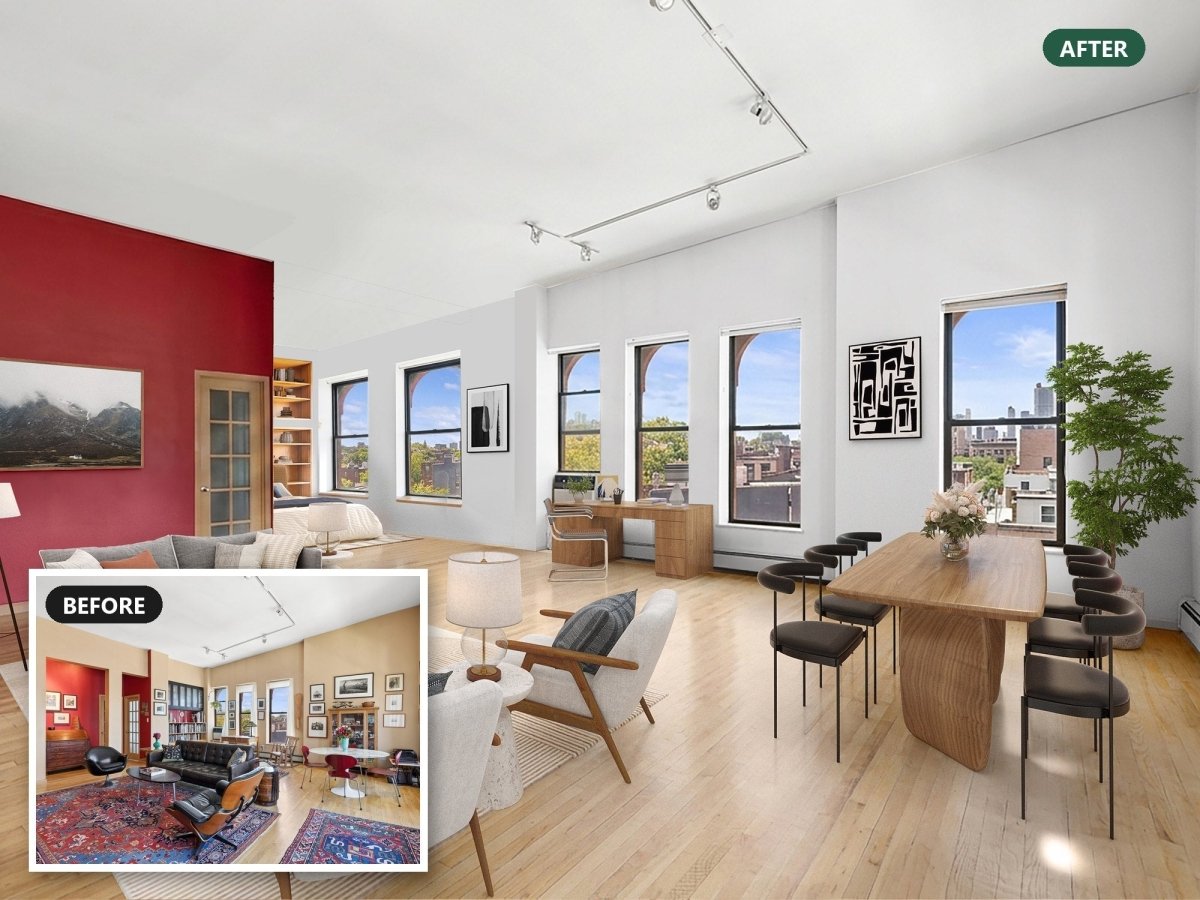
Short answer: to remove furniture from a photo yourself, use a dedicated AI furniture remover such as REimagineHome, RoomLab, Decoratly or DecAI to empty a whole room, or a free object eraser like Google Photos Magic Eraser or iPhone Clean Up for one or two pieces. For a listing's main photos, a human editor is safer. Label every altered photo.
Updated October 2026. Every price, free tier and platform below was checked on each company's own website on October 26, 2026.
One disclosure first: Bella Virtual is a done-for-you service. Our designers remove and restage furniture by hand, and we don't use AI for it. For plenty of jobs an app is the right call anyway, and we have tried to be fair to them. Bella appears near the end of this guide as the "have a person do it" option, not as a ranked app.
If you typed "remove furniture from photo" into an app store, you saw dozens of results. They do two different jobs. An AI furniture remover empties the room photo and rebuilds the floor and wall sections behind the furniture, so you get a clean slate: a blank canvas for virtual staging. An object remover erases one item at a time, which is fine for a lamp or a laundry basket but struggles with a sectional sofa. Both are useful for real estate agents. Pick the tool by the job, not by the ad.
AI furniture removal tools at a glance
| Tool and best use | Free option | Paid from |
|---|---|---|
|
REimagineHome Emptying occupied rooms, then AI staging |
5 free designs for new users | $14/month |
|
RoomLab Emptying a room, then restyling it |
None listed | $15 one-time |
|
Decoratly One-tap removal for a single listing |
1 redesign (no removal) | $9.99 for 30 days |
|
DecAI Prompt-based removal on web or phone |
Free to try | In-app plans |
|
Ideal House Remove All or click to remove |
10 credits a day | Paid plans |
|
Home-Design.ai Quick removal with no signup |
Advertised free | $9.99 for 30 credits |
|
Spacely AI Designers who also render |
Not listed | $9 for 200 credits |
|
Google Photos Magic Eraser Small objects on any phone |
Free | None |
|
Apple Photos Clean Up Small objects on newer iPhones |
Free, built in | None |
|
Canva Magic Eraser Agents already using Canva |
30-day Pro trial | US$120/year |
|
Photoshop Remove tool Full manual control |
None | Photoshop plan |
|
PhotoDirector General phone editing |
Free core editing | Credits or Premium |
|
BoxBrownie (human) Item removal by editors |
None | US$10/photo |
|
Bella Virtual (human) Removal plus restaging by a designer |
None | US$39/photo |
"Free" means very different things here: a few free designs, a daily credit allowance, a watermark, or a phone feature you already own. That trade off matters, so read the details before you plan a listing around a free app.
The best AI furniture removal tools to create an empty room
These apps are built for removing furniture from a room photo, not just for erasing small objects. Each one generates the floor, baseboards and walls that were hidden, which is the hard part. With every AI furniture removal tool below, you upload a photo, choose what goes, and download a new image of the room.
1. REimagineHome: an "Occupied to Vacant" tool for agents
REimagineHome has a dedicated Empty Your Space tool. You upload one or several photos and type a prompt such as "empty the room" or "keep the chair, remove the table", then refine with follow-up prompts. Its site quotes an average of about 60 seconds per result, and you can restage the empty room with virtual furniture in the same app. New users get 5 free designs; paid plans run from $14 to $99 a month on a credit based system, and each new generation costs a credit. REimagineHome also has a partner page for CRMLS members, so check whether your MLS already gives you access.
2. RoomLab: empty a room, then restyle the same room
RoomLab lists "Empty a room" and "Declutter rooms" among its tools. An image generation uses about 10 credits and takes around 25 seconds. There is no free tier on its pricing page: the Personal pack is a one-time $15, and Pro is $20 a month for 400 credits, roughly 40 images. One catch for agents: RoomLab deletes generated images a month after creation on Pro and Ultra, so download your finished room image right away.
3. Decoratly: one-tap removal options, sold as a 30-day pass
Decoratly runs in the browser on a phone or a computer, with no app to install. Its Remove Objects tool has six one-tap options (all furniture, clutter, wall decor, lighting fixtures, plants and accessories, carpets and rugs) or a text box such as "remove the armchair by the window". Results take about 30 seconds. Removal is part of Pro, a one-time $9.99 for 30 days that does not renew. The trial is 1 style redesign, watermarked, and it doesn't include removal. Decoratly's own FAQ is refreshingly honest: the floor behind a removed item "is a plausible guess, not what is really there."
4. DecAI Furniture Remover: free to try on web, iPhone and Android
DecAI works from a prompt: describe what to remove ("remove everything except the bed") or use "Empty entire room" for full AI furniture removal. It runs in any browser and on mobile devices through its iOS and Android apps, with results in about 30 seconds. You can try it without paying; the iPhone app is a free download with in-app purchases and sells weekly, monthly, yearly and lifetime plans. Its tips page recommends removing similar objects together and not mixing too many tasks in one prompt.
5. Ideal House: free daily credits and a "Remove All" button
Ideal House has two modes: Remove All clears the whole room, and Click to Remove erases a single piece. It works in the browser on desktop and mobile devices, and there is also an Ideal House app. The pricing page mentions 10 free daily credits, with paid Lite, Plus and Pro plans for more. Its page pitches the tool to real estate agents and interior designers as "the first step to creating perfect virtual staging." Its FAQ adds that when you try to remove people, harsh shadows or reflections, results "may vary".
6. Home-Design.ai: free furniture removal with no signup
Home-Design.ai advertises a free AI furniture removal tool with no signup. You upload a room photo, then remove all the furniture or select specific pieces, such as just a sofa. A basic generation uses 1 credit. For more, one-time credit packs start at $9.99 for 30 credits, and those credits never expire.
7. Spacely AI: an "Empty the Room" tool for designers
Spacely AI added a Remove All Furniture feature in 2024 that clears a room photo in a single click, and lists "Empty the Room" among the tools on its Personal, Studio and Agency plans. It is built mainly for architects and interior designers, with integrations for SketchUp, Revit, AutoCAD and Rhino. Credit top-ups start at $9 for 200 credits.

Free object remover apps to erase distractions
If you only need to remove unwanted objects, such as a laundry basket, a stack of boxes or a single chair, a general object remover is often a free app already on your phone. These tools remove objects by filling the gap from the surrounding pixels. That works on plain walls and simple floors, and it gets weaker as the object gets bigger. Some erasers that show up for this search, such as Photoroom's object remover, are built mainly for product photos and product images for online sellers.
Google Photos Magic Eraser (Android and iPhone)
Magic Eraser is free for eligible Google Photos users on Android and iOS. Open a photo, tap Edit, then Tools (iOS) or Actions (Android), choose Magic Eraser, and tap or brush over what should go. Google's own advice is that Magic Eraser works best for quick fixes on smaller parts of a photo, while Magic Editor's Erase handles larger, more prominent objects better.
Apple Photos Clean Up (iPhone 15 Pro and later)
Clean Up is built into the Photos app on iPhone 15 Pro, iPhone 15 Pro Max and iPhone 16 models or later, with iOS 18.1 or later and Apple Intelligence turned on. Open a photo, tap the edit button, choose Clean Up, then tap, brush or circle the object. It costs nothing extra and suits small background clutter. Emptying an entire room is a stretch.
Canva Magic Eraser
Canva's Magic Eraser lets you brush over an object, click to select it, or pick the foreground, and a brush size slider handles tight spots. It is a Canva Pro feature: Pro is US$120 a year for one person, with a 30-day trial. Useful if you already create flyers and social posts in Canva.
Adobe Photoshop Remove tool and Generative Fill
Photoshop on desktop is the most controllable option. The Remove tool lets you brush or loop around an object, has a "Find distractions" option that can find and remove people, wires and cables, and lets you switch generative AI on or off. Adobe says generative credits are not deducted for the Remove tool. For a big sofa, select it with a little room around it and use Generative Fill, which offers three variations to choose from. The trade off is time and skill: this is a photo editor for people who already know one.
PhotoDirector (iPhone, Android and Windows)
CyberLink's PhotoDirector is a free download on iPhone and Google Play with an Object Removal tool. Core editing is free; its AI tools run on credits, and Premium adds 4K export. It is a general photo editing app aimed more at portraits and social posts than at property listings.
How to remove furniture from a photo with AI, step by step
The steps are nearly the same in every AI furniture removal app:
- Start with a well lit photo. Open the blinds, turn on the lights, and shoot wide and level at chest height with as much of the space in frame as you can. The AI can only rebuild what it can guess from the visible floor and walls.
- Upload a photo at full resolution. Use the original file, not a screenshot. Several tools also offer high resolution output or 4K on paid plans.
- Pick "empty the room" or select pieces. Decide what goes: the furniture, the decor, personal photos on the walls, or everything. To empty the room, use the one-click option. For a single photo with one bad piece, mark it or name it in the prompt.
- Remove in one pass, then refine. If the first pass changes too much, run the removals one at a time. Decoratly and DecAI both recommend this.
- Check the new image at full size. Zoom in on baseboards, floor patterns, window frames and the corners where the furniture stood, and compare it with the original room photo.
- Keep the original photo. You will need it for disclosure, and some MLSs and states now require buyers to be able to see it.
Where AI furniture removal still goes wrong
AI furniture removal tools are genuinely good at simple rooms. They struggle in the same places every time, so check these before a listing photo goes live:
- Invented floors and walls. The tool generates what was behind the furniture. A herringbone floor can turn into planks, and a removed rug can reveal a floor that doesn't exist, which misstates the space.
- Missing built-ins. Shelves, radiators and window seats sometimes vanish with the furniture next to them. Those are part of the house, and removing them misrepresents it.
- Shadows and light. Harsh shadows from a removed sofa can stay on the floor, and reflections in glass rarely update.
- Consistency across a listing. When several photos show the same room from two angles, each generation guesses differently, so the floor or the wall color may not match from one shot to the next.

Disclose what you removed in listing photos
Removing furniture is legal and common, but an altered photo can create a misleading picture, so it has to stay honest. NAR's Code of Ethics requires REALTORS to avoid exaggerating, misrepresenting or concealing pertinent facts (Article 2) and to present a "true picture" in advertising (Article 12). NAR reported in October 2026 that California's AB 723, in effect since January 1, 2026, requires a disclosure whenever an altered image adds, removes or changes elements of a property, including furniture, plus access to the original image. The same article suggests specific labels such as "Objects digitally removed" rather than a vague "AI was used". NAR has also reported that NorthstarMLS asks for altered images to be labeled and paired with an unaltered photo, and that Wisconsin has similar requirements coming in 2027.
The practical rules: label every photo where furniture was removed, keep the original, and never remove anything permanent or anything that hides a defect, such as a crack, a stain or water damage. Check your own MLS's photo rules before you upload anything.
When a human editor is worth it
For a rental, a quick test or a pitch to a seller, an app is usually enough. For the photos that sell an occupied home (the first photo on the MLS, a luxury listing, a room with a patterned floor or built-ins, anything printed), a person checking every edge, and how the space reads, is worth paying for. Two human options:
- BoxBrownie lists Standard Item Removal at US$10 a photo (furniture, large rugs, even people) and Minor Item Removal at US$5, with a 24-hour turnaround.
- Bella Virtual offers furniture removal and virtual staging at US$39 a photo. A designer with an interior design background removes everything or only the pieces you name, restores the room behind them, and restages it in 24 to 48 hours, with unlimited revisions for two weeks and volume discounts from 5% at 3 photos to 20% at 21. If you only need a few items erased, item removal is part of our photo editing service at US$15 a photo. Every edit is done by hand by a designer, not by AI.


For more on how the job works, see our guides to item removal in photo editing and virtual staging for occupied homes.
Which tool should you use?
- One or two small pieces: Google Photos Magic Eraser or iPhone Clean Up, already on your phone at no cost.
- An empty room, free: Ideal House's daily credits, Home-Design.ai, or REimagineHome's 5 free designs.
- An empty room, then AI staging: REimagineHome or RoomLab, which both restage the same room in one app.
- One listing, low commitment: Decoratly's $9.99 one-time pass.
- Full control: Photoshop's Remove tool and Generative Fill.
- The photos that sell the home: a human editor. If you're weighing that choice, our DIY vs hiring a service guide walks through it.
FAQ: removing furniture from photos
Can AI remove furniture from a picture?
Yes. Dedicated AI furniture removers such as REimagineHome, RoomLab, Decoratly, DecAI and Ideal House can empty a room photo in about a minute or less. The floor and walls behind the furniture are generated, not real, so check the result at full size and label it in a listing.
Which photo app can remove objects for free?
Google Photos Magic Eraser is free for eligible users on Android and iPhone, and Apple's Clean Up is built into Photos on iPhone 15 Pro and later. For whole-room furniture removal, Ideal House offers free daily credits, Home-Design.ai needs no signup, and REimagineHome gives new users 5 free designs.
Can an iPhone remove unwanted objects from photos?
Yes. On iPhone 15 Pro, iPhone 15 Pro Max and iPhone 16 models or later with iOS 18.1 or later, open a photo in Photos, tap the edit button, choose Clean Up, and tap, brush or circle the object. Older iPhones on iOS 15 or later can use the free Google Photos app instead.
Is Google Magic Eraser free?
Yes. Google says Magic Eraser and its other AI editing tools are available to eligible Google Photos users at no cost, on Android and iOS. It works best on smaller objects.
Do I have to disclose furniture removal on the MLS?
You should, everywhere. NAR's Code of Ethics requires a "true picture" in advertising, California's AB 723 requires disclosure and access to the original image for digitally altered listing photos, and many MLSs have their own labeling rules. A clear label such as "Furniture digitally removed" on or next to the photo is the safe default.
How much does it cost to remove furniture from a photo?
AI furniture removal apps start free, and the paid entry points we checked run from about $9 to $20 for a pass, a credit pack or a month of credits. Human services charge per photo: BoxBrownie lists US$10 for standard item removal, and Bella charges US$15 for item removal or US$39 for removal plus virtual staging.
What is the difference between furniture removal and virtual staging?
Furniture removal takes things out of a room photo and leaves an empty room. Virtual staging adds virtual furniture to an empty room. Agents with occupied homes often need both: remove the seller's furniture first, then add virtual furniture that suits the buyer.