July 28, 2026 · Bella Staging
Virtual Staging for Occupied Homes: Removing Furniture and Clutter Digitally
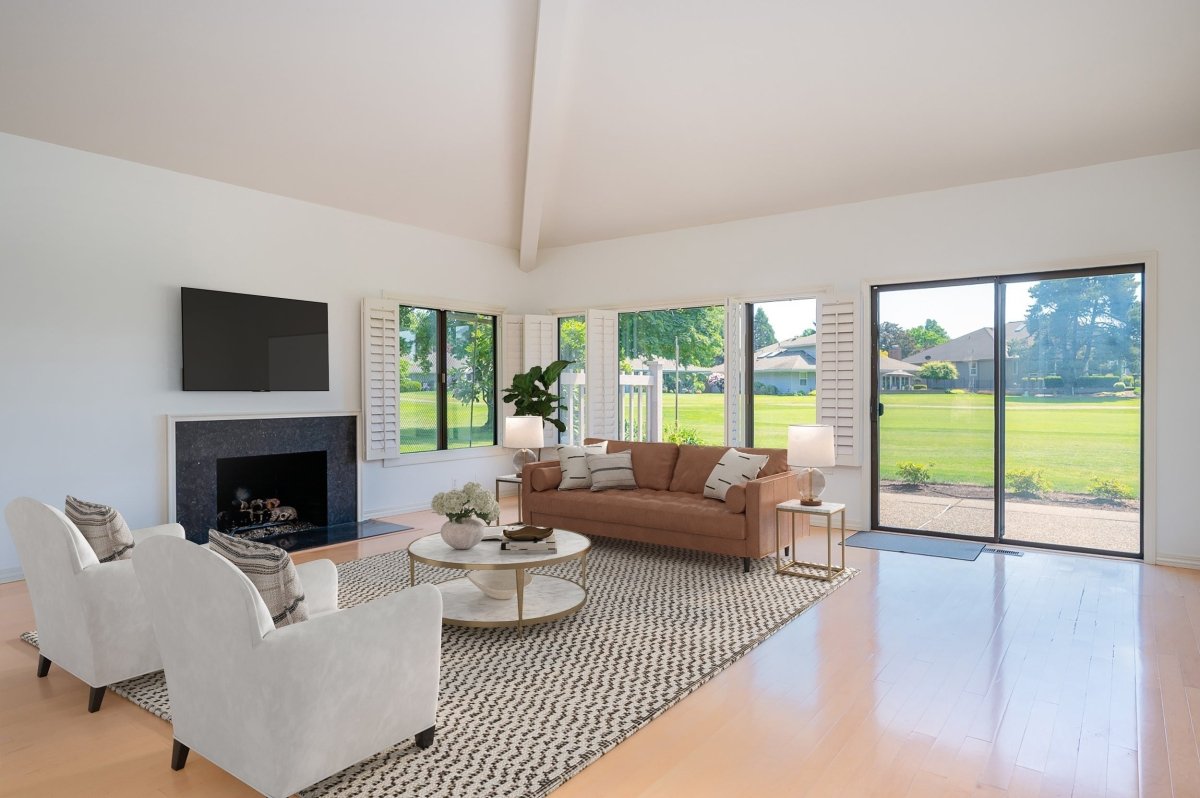
Selling an occupied property does not mean every piece of furniture must be physically removed before the listing photos are taken. Virtual staging for occupied homes allows existing furniture, personal belongings, and visual clutter to be digitally removed from property photos. Once the room has been cleared digitally, it can be restyled with updated furniture and décor to create a cleaner, more market-ready presentation.
This process is especially useful for sellers who still live in the property, rental units with tenants, and homes filled with outdated or mismatched furniture.
What Is Virtual Staging for Occupied Homes?
Virtual staging for occupied homes is a digital photo-editing process designed for properties that are currently furnished or lived in.
Instead of requiring the homeowner to move large furniture, place belongings in storage, or completely empty the property, professional designers can digitally:
- Remove existing furniture
- Clear personal belongings and clutter
- Replace outdated furnishings
- Improve the room’s visual organization
- Add coordinated furniture and décor
- Create a consistent design style throughout the listing
Bella Virtual’s Furniture Removal and Virtual Staging Service combines digital furniture removal with professional virtual staging. This allows occupied rooms to appear cleaner, more spacious, and ready for online marketing without physically moving every item.
Can Existing Furniture Be Removed Digitally?
Yes. Existing furniture can be digitally removed from a property photo, provided the visible parts of the room can be reconstructed realistically.
Large items that may be removed include:
- Sofas and armchairs
- Beds and bedside tables
- Dining tables and chairs
- Desks and office furniture
- Cabinets and shelving units
- Rugs, lamps, and decorative items
After the furniture is removed, the designer reconstructs the areas that were previously hidden. This may include flooring, walls, baseboards, windows, or other architectural details.
For the best results, the original photo should be clear, well-lit, and taken from an appropriate angle.
Digital Decluttering vs. Furniture Removal
| Service | What It Includes | Best Used For |
|---|---|---|
| Virtual Decluttering | Digitally removes small distracting objects, personal belongings, and unnecessary décor while keeping the main furniture in place. | Counters, shelves, desks, floors, and rooms with light clutter. |
| Furniture Removal | Digitally removes large furniture and furnishings from the property photo. | Sofas, beds, dining sets, desks, cabinets, rugs, and other bulky items. |
| Furniture Replacement | Removes selected furniture and replaces it with updated, coordinated pieces. | Occupied rooms with outdated, oversized, damaged, or mismatched furniture. |
| Complete Removal and Virtual Staging | Digitally clears most or all furniture and clutter before adding a completely new design and furniture layout. | Major listing transformations, highly personalized interiors, and rooms that need a full visual update. |
What Can Be Removed Through Virtual Decluttering?
Small objects can make a room appear visually crowded, even when the property is clean and well maintained.
Virtual decluttering may be used to remove:
- Family photographs
- Toys and children’s items
- Kitchen appliances and containers
- Papers and office supplies
- Toiletries and bathroom products
- Clothing and laundry baskets
- Excessive wall décor
- Cords, bins, and storage boxes
- Personal collections
- Pet accessories
Removing these distractions helps buyers focus on the room’s size, layout, natural light, and architectural features rather than the current owner’s belongings.
When Is Furniture Replacement the Better Option?
Not every occupied room needs to be completely emptied digitally. In some cases, the existing furniture arrangement is functional, but individual pieces may appear outdated, oversized, or inconsistent.
Furniture replacement allows selected items to be removed while retaining suitable parts of the original room.
For example, a designer may:
- Replace a large sectional with a smaller sofa
- Update an old dining set
- Replace patterned bedding with neutral linens
- Remove bulky cabinets
- Add modern lighting and artwork
- Keep an existing table while replacing the chairs
- Replace mismatched furniture with a coordinated collection
This approach can create a noticeable improvement without requiring a complete redesign.
How Complete Digital Restyling Works
Complete digital restyling involves removing most or all visible furniture before creating a new interior design for the room.
Step 1: Review the Original Photo
The designer examines the room’s perspective, lighting, architectural details, and visible surfaces. The image is also reviewed to determine which areas will need to be digitally reconstructed.
Step 2: Remove Furniture and Clutter
Existing furniture, decorations, and personal belongings are digitally removed. Hidden areas of the walls, floors, and other surfaces are carefully recreated.
Step 3: Select a Suitable Design Style
Furniture and décor are chosen according to the property type, target market, room size, and client preferences.
Popular virtual staging styles include:
- Contemporary
- Modern
- Transitional
- Scandinavian
- Mid-century modern
- Coastal
- Luxury
- Farmhouse
- Minimalist
Step 4: Add Realistically Scaled Furniture
Furniture is positioned according to the room’s actual proportions and perspective. Proper scaling is essential because oversized furniture can make the room appear smaller, while furniture that is too small may create an unrealistic result.
Step 5: Match the Lighting and Perspective
Shadows, brightness, color temperature, and perspective are adjusted so the added furniture appears naturally integrated into the original photograph.
Step 6: Review the Final Image
The completed image is checked for realism, consistency, and overall presentation before delivery.
Benefits of Virtual Staging for Occupied Homes
Sellers Can Continue Living in the Property
Homeowners do not need to remove every large piece of furniture before the photography session. This makes the listing process more convenient, particularly when the property must remain functional during the sale.
Listing Photos Look Cleaner
Digital removal can reduce visual distractions and create a more organized online presentation.
Outdated Furniture Can Be Replaced
The property may be well maintained even when the furniture does not reflect the style buyers expect. Virtual restyling helps present the room with updated, coordinated furnishings.
Rooms Can Appear More Spacious
Removing oversized furniture and unnecessary objects can make the room’s proportions easier to understand.
The Listing Can Have a Consistent Style
Different rooms in an occupied home may contain unrelated furniture styles. Virtual staging can create a coordinated visual direction throughout the listing.
Buyers Can Understand Each Room’s Purpose
Appropriate furniture placement can clearly communicate whether a space is intended to function as a living room, dining area, bedroom, office, or multipurpose room.
Which Occupied Properties Benefit Most?
Virtual furniture removal and restyling can be useful for:
- Owner-occupied homes
- Tenant-occupied rental properties
- Estate sale properties
- Homes with outdated furniture
- Properties with oversized furnishings
- Homes with highly personalized décor
- Rooms being used for multiple purposes
- Listings with inconsistent design styles
- Properties where physical staging is impractical
It can also help agents prepare a more consistent set of marketing photos when some rooms are vacant and others remain furnished.
How to Prepare Photos for Digital Furniture Removal
Although the property does not need to be physically emptied, preparing the room before taking photos can improve the final result.
Before photographing the property:
- Open curtains or blinds to allow natural light into the room.
- Turn on available interior lights.
- Remove extremely small or transparent objects when possible.
- Avoid blocking important architectural features.
- Take photos from a level and balanced position.
- Use high-resolution images.
- Avoid heavy filters or excessive image compression.
- Photograph the entire room rather than focusing on one piece of furniture.
Clear, properly exposed photographs give designers more information to work with and make hidden surfaces easier to reconstruct.
Are There Any Limitations?
Digital furniture removal can produce impressive transformations, but the quality of the original photo remains important.
Furniture removal may be more complex when:
- A large object covers most of the floor or wall
- Important architectural details are completely hidden
- The image is blurry or very low-resolution
- The room is extremely dark
- Reflective surfaces show unwanted objects
- Furniture blocks windows, doors, or built-in features
- Several large objects overlap one another
In these situations, the designer may need additional reference photos to understand what is behind the furniture.
Taking a second photo from another angle can provide useful information about the flooring, walls, and architectural features that need to be reconstructed.
Should Original Photos Still Be Included?
Virtually staged images should be presented transparently. Images should be labeled as virtually staged, and agents should follow the disclosure requirements of their local MLS or advertising platform.
Including the original photo alongside the virtually staged version can help buyers understand which elements were digitally added or removed.
Virtual staging should communicate the property’s potential without changing permanent features in a way that could misrepresent the home.
Virtual Furniture Removal vs. Physical Furniture Removal
| Comparison | Digital Furniture Removal | Physical Furniture Removal |
|---|---|---|
| Process | Furniture is digitally removed from the listing photo. | Furniture is physically moved out of the property. |
| Storage Requirements | No transportation or storage unit is required. | Furniture may need to be transported and placed in storage. |
| Convenience | Sellers can continue using their existing furniture while the property is listed. | Some rooms may become temporarily empty or unusable. |
| Restyling Options | Different furniture styles, layouts, and color schemes can be explored digitally. | New furniture must be rented, delivered, arranged, and later removed. |
| Property Condition | The home remains occupied and unchanged during in-person showings. | The property may be vacant or physically staged for showings. |
| Best Used For | Improving online listing photos quickly and conveniently. | Creating a furnished experience for buyers during in-person showings. |
Digital furniture removal improves the marketing images, but it does not change the actual condition of the property during an in-person showing. Buyers should therefore be able to distinguish between the original room and its virtually staged presentation.
Frequently Asked Questions
Can virtual staging remove all the furniture from an occupied room?
In many cases, yes. Large furniture and smaller decorative items can be digitally removed. However, the final result depends on the quality of the photograph and how much of the room’s permanent surfaces are visible.
Can you remove clutter without replacing the furniture?
Yes. Virtual decluttering can remove smaller distractions while keeping suitable furniture in place.
Can only one piece of furniture be replaced?
Yes. Selected items can be removed and replaced while retaining the rest of the existing room.
Can the entire room be redesigned?
Yes. The room can be digitally cleared and restyled with a completely new furniture layout, color palette, and design direction.
Do I need to photograph the room after removing everything?
No. The service is designed for rooms that still contain furniture. However, removing small items and opening curtains before taking the photo can help produce a cleaner result.
Will the virtually staged room look exactly like the property during a showing?
No. Virtual staging represents a design concept for marketing purposes. The property will still contain its original furniture and belongings unless they are physically removed.
Should virtually staged photos be disclosed?
Yes. Images should be labeled according to the rules of the MLS, advertising platform, or local real estate authority where they will be published.
Transform an Occupied Home Without Moving Everything
An occupied home does not have to look crowded, outdated, or overly personalized in its listing photos. Through digital decluttering, furniture removal, and complete virtual restyling, the property can be presented with a cleaner and more coordinated appearance.
Bella Virtual’s professional designers can remove distracting furniture and belongings before creating a fresh interior design that complements the room’s architecture and target market. Bella Virtual states that its staging images are composed by interior designers and prepared for real estate marketing and MLS use.
Explore Bella Virtual’s Furniture Removal and Virtual Staging Service, browse the complete collection of Virtual Staging Services, or contact Bella Virtual to discuss your occupied property.