October 19, 2026 · Bella Virtual Staging
DIY Virtual Staging vs Hiring a Service: Which Should You Use?
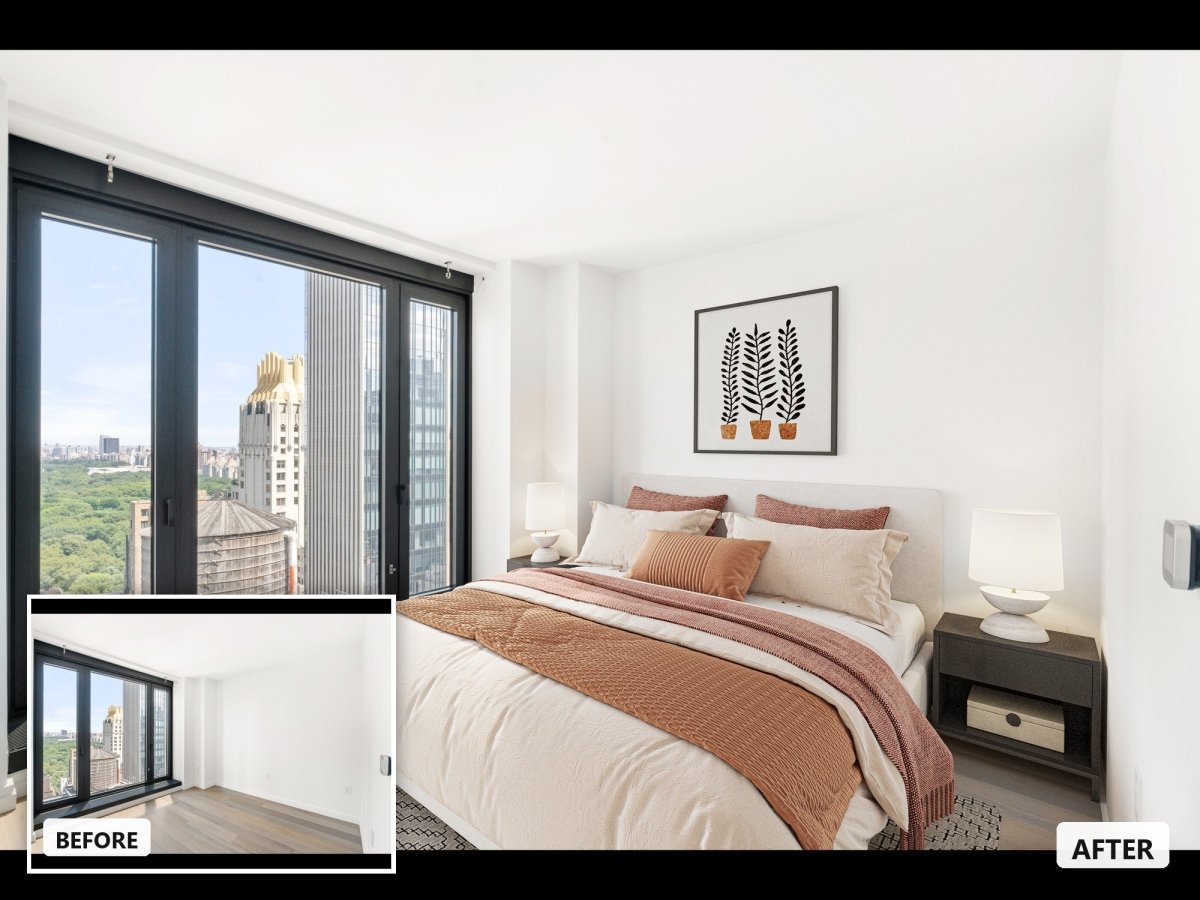
Short answer: DIY virtual staging, with an AI app or a drag-and-drop editor, is fine for rentals, quick tests and lower-priced listings, as long as you check every image yourself. Hire a virtual staging service when the photos have to carry the listing: luxury homes, empty new construction, rooms with tricky architecture and anything that will be printed. The deciding factor is rarely the price per photo. It is who catches the mistakes.
One disclosure first: Bella Virtual Staging is a done-for-you service. Our interior designers stage every photo by hand, and we don't use AI. We have tried to be fair to DIY anyway, because for plenty of jobs it is the right call. This page is a decision guide. If you already know you want an app, our roundups of AI virtual staging software and free virtual staging apps compare the tools one by one.
What "DIY virtual staging" means in 2026
Doing it yourself used to mean Photoshop and a folder of furniture cutouts. Today there are three DIY routes, and they are very different jobs:
- One-click AI staging apps. You upload a photo of an empty room, choose a room type and a style, and the app generates a furnished version in seconds. You keep the best result or generate again.
- Drag-and-drop editors. You place 3D furniture in the photo yourself, so you control the layout instead of rerolling. Apply Design's DIY editor works this way.
- Manual editing. Compositing furniture in Photoshop or GIMP, or rebuilding the room in a 3D program. You get full control, but matching perspective, light and shadows takes real skill and hours per room.
Hiring a service means you upload the photos, add a note on the style and the buyer you are targeting, and a designer sends back finished, checked images. Some services use people from start to finish; others run AI and add a review step. Ask which one you are paying for.
DIY vs hiring a service at a glance
| DIY app or editor | Done-for-you service | |
|---|---|---|
| Cost per photo | From about $0.50 to $15, depending on the tool and plan | Usually priced per photo: US$30 at BoxBrownie, US$37 at Bella |
| Your time | You generate, review and fix every image | Upload, write a short brief, approve |
| Turnaround | Seconds to minutes per render | Hours to days; Bella delivers in 24 to 48 hours |
| Who checks scale and architecture | You | The designer first, then you |
| Changes | Regenerate or edit it yourself | Ask for revisions; at Bella, unlimited for two weeks |
| Same room from several angles | Hard: each render is generated on its own | A designer can keep the same furniture in every shot |
| Best for | Rentals, tests, seller pitches, simple rooms | Luxury, new construction, print, hero photos on the MLS |
What each option really costs
DIY is cheaper per photo, by a lot. These are prices we checked on each company's own site on October 19, 2026:
- Virtual Staging AI (app): subscriptions from $16 a month for 6 photos to $79 a month for 150 photos, billed yearly. That works out to about $2.67 down to $0.53 a photo, with unlimited renders and downloads within the plan.
- Apply Design (app): no subscription. You buy Apply Coins at $7 to $10 each. A one-click staged photo uses 1.5 coins ($10.50 to $15), and a photo you stage yourself in the drag-and-drop editor uses 1 coin ($7 to $10). The first image is free.
- BoxBrownie (service): virtual staging is listed at US$30 per image.
- Bella (service): US$37 per photo, designed by people, delivered in 24 to 48 hours, before volume discounts.
The sticker price leaves out two costs. The first is your time. With an app, you are the designer and the quality checker, so every image needs a look at full size, and some rooms take several attempts. The second is the cost of a bad image. A sofa that could never fit the room, or a window the software quietly moved, can cost you more in wasted showings and awkward questions than the staging itself.
Take an eight-photo listing. On Virtual Staging AI's $19-a-month plan (20 photos, billed yearly), the staging costs less than one photo from a service, but you will spend part of your evening generating, comparing and checking. At Bella, the same eight photos are US$296 before volume discounts, and a designer has done the checking before the images reach you. Which is cheaper depends on what an hour of your time is worth and how much the photos matter for that listing.

Where DIY virtual staging goes wrong
AI staging has improved quickly, and on a simple, well-lit bedroom it can look convincing. The problems show up on harder rooms and on a closer look. Check for these whatever tool you use.
Wrong scale
An app does not measure the room; it guesses from the photo. Compare the furniture with things of known size, such as doors, windows and kitchen counters. A bed that is too small makes a bedroom look huge, and a sofa that is too big makes a living room look cramped. Either way, the buyer arrives at the showing expecting a different room.
Warped lines and changed architecture
Generative tools sometimes change what they should leave alone: a window changes shape, the flooring changes color, a light fixture appears or disappears, a straight wall bends. Staging adds furniture. It must not change the property, so compare every staged image with the original before you publish it.
Floating furniture and missing shadows
Legs that don't touch the floor, rugs with no shadow, light that falls from the wrong side of the room. Buyers may not name the problem, but they sense the photo is off, and that doubt carries over to the listing.
Rooms that change from shot to shot
If you photograph a living room from two angles, an app stages each photo separately, and the sofa can change color or shape between them. Buyers scrolling the gallery notice.
Style that doesn't fit the buyer
Presets are generic. A downtown condo, a suburban family home and a beach house each call for different furniture, and the style tells buyers who the home is for.
Our comparison of AI virtual staging vs human designers goes deeper on each of these and shows how to vet any staged photo.
Disclosure applies either way
Whether you stage a photo yourself or hire someone, a virtually staged photo should be disclosed as one. Label each staged image "virtually staged", keep the original empty-room photo on file, and check your MLS's photo rules before you upload, since each board sets its own. For REALTORS, Article 12 of the NAR Code of Ethics requires them to "present a true picture in their advertising, marketing, and other representations." A label covers the furniture. It does not cover a changed window or floor.
When DIY virtual staging is the right call
- Rentals. Rental listings rarely justify a designer's fee, and a few dollars a photo fits the budget.
- Quick tests and seller pitches. Show a seller three styles for their living room in a listing presentation, or try a look before you commit to it.
- Lower-priced listings with simple rooms. Square rooms, good light and a straight-on shot are the easiest cases for an app.
- Social posts and ideas, where the image starts a conversation rather than selling the home.
- You have the eye and the time. If you can spot a scale problem in seconds and enjoy the work, an app is a fast, cheap tool.
When to hire a virtual staging service
- Luxury listings. Buyers look longer and closer, often on large screens, and expect furniture that matches the price. See luxury virtual staging.
- Empty new construction. Builders need every plan staged in a consistent style across a community, often from many angles. That is designer work.
- Listings that will be printed. Brochures, feature sheets and signs show flaws a phone screen hides, and they need full-resolution files.
- Difficult rooms. Vaulted ceilings, open plans with no clear zones, lofts, odd angles and very wide shots.
- Several angles of the same room. A designer keeps the furniture the same in every shot.
- Listings you will be judged on. If a seller hired you partly for your marketing, a few dollars more per photo is small next to your reputation.

Five questions to decide
- Will this be the main photo on the MLS, or printed? If yes, hire a service.
- Is the room simple: square, bright and shot straight on? If yes, DIY can work.
- Do you have time to generate, check and fix every image before the listing goes live? If not, hire a service.
- Does the same room need to match across several photos? If yes, hire a service.
- Is it a rental, a test or a pitch? If yes, DIY is probably enough.
Our recommendation
Use DIY apps for drafts, rentals, quick tests and simple rooms on lower-priced listings, and compare every image with the original before it goes anywhere. Hire a service for the photos that sell the listing: the hero shots on the MLS, luxury homes, new construction and anything printed. Many agents end up doing both: an app to test ideas with a seller, then a designer for the final images.
If you are comparing services, our comparison of virtual staging companies lists prices and turnaround side by side. If you hire Bella, virtual staging is US$37 per photo, designed by people and never AI, delivered in 24 to 48 hours with unlimited revisions for two weeks.
Frequently asked questions
Is DIY virtual staging good enough for the MLS?
It can be, if the image is realistic, the room's permanent features are unchanged and the photo is labeled as virtually staged. The risk is that you are the only quality check, so compare every staged photo with the original before you upload it.
How much does it cost to hire a virtual stager?
Services usually charge per photo. As of October 2026, BoxBrownie lists virtual staging at US$30 per image and Bella charges US$37 per photo. Our companies roundup compares more providers.
Can I virtually stage photos for free?
Some apps give you a free first image or a few free credits, often with a watermark or limits. Our guide to free virtual staging apps lists what each one actually includes.
Do I have to disclose virtual staging?
You should, whether you staged the photo yourself or hired someone. Label staged photos, keep the originals and follow your MLS's rules.
How long does a virtual staging service take?
It varies by company. Bella delivers in 24 to 48 hours. An app returns a render in seconds, but checking and fixing the results takes your time.
Is AI virtual staging the same as DIY?
Most DIY staging today uses AI, but not all AI staging is DIY. Some services run AI and add a human review, and some, like Bella, use designers throughout. Ask any service how its images are made.
Want a designer to do the checking?
Send us your empty-room photos and a Bella designer will stage them to scale, in a style that fits your buyer, in 24 to 48 hours. Order virtual staging or see pricing and volume discounts.