August 21, 2026 · Mackenzie Kim
Best Free Virtual Staging App in 2026: 12 Free Tools, Verified
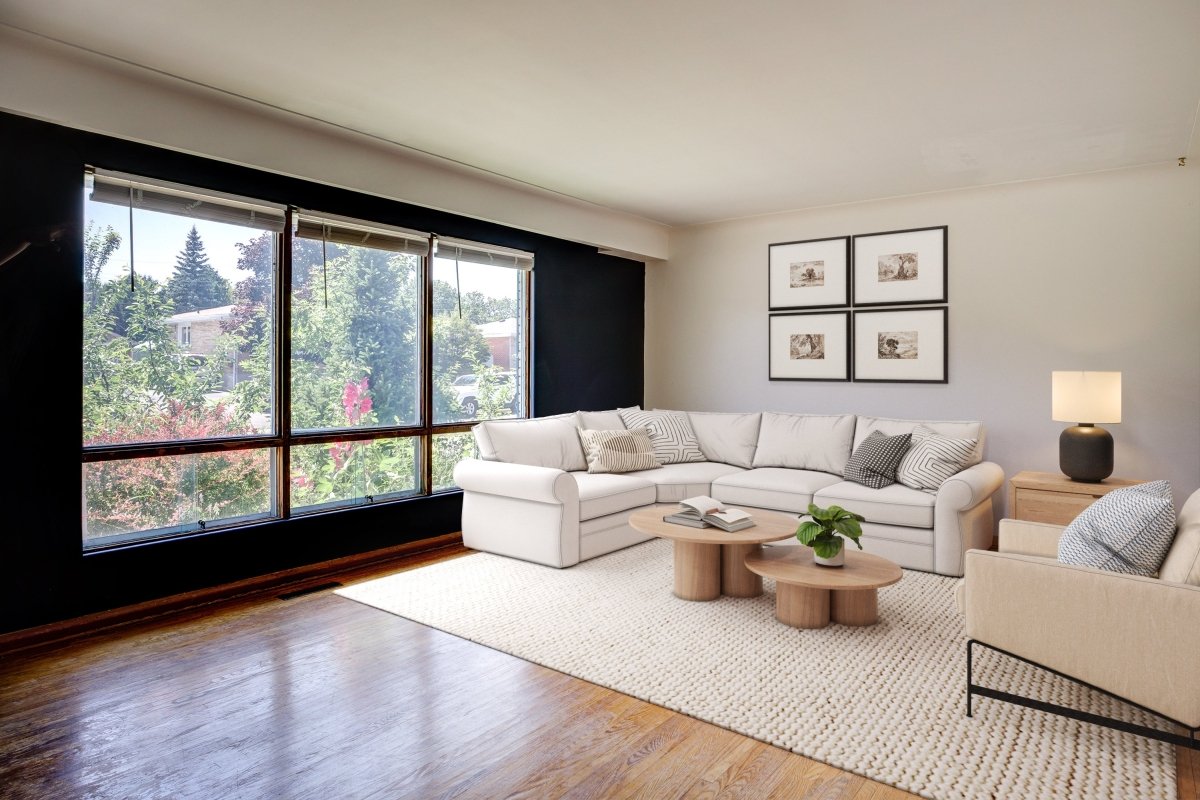
The best free virtual staging app is the one that stages your own listing photo at no cost. By that test, Apply Design (first photo free, no card), Remodel AI (3 free designs) and REimagineHome (5 free designs) give the most useful free allowance in 2026. If you only need to plan a layout, Planner 5D, Homestyler and Sweet Home 3D are free for good, and Sweet Home 3D is the best free virtual staging software for Mac.
We checked every tool below on its own website in September 2026. For each one we looked at what is actually free, what the first paid plan costs, and which platforms it runs on. Virtual staging tools with no free option for staging your own photos were removed. Prices are in USD and change often, so read them as "as of September 2026".
A note on who wrote this: Bella Virtual Staging is a paid service where interior designers stage every photo by hand. We have no affiliation with any app on this list. For paid AI software and the AI vs human question, see our separate guide to AI virtual staging software.
Best free virtual staging app for each job, at a glance (as of September 2026)
| App | What is free | Paid from | Platforms | Best for |
|---|---|---|---|---|
| Apply Design | First photo free, no credit card required | $7–$10 per coin; one-click staging is 1.5 coins | Web | One real listing photo, with drag and drop control |
| Remodel AI | 3 free designs | Pro $29/mo, billed $349/yr | Web, iOS, Android | Testing styles on a phone |
| REimagineHome | 5 free designs for new users | Credit plans, advertised at $14–$99/mo | Web | Staging plus furniture removal |
| AI HomeDesign | Free credits on sign-up, no card | Pro $19/mo billed yearly, or $35 monthly (30 photos) | Web | Decluttering and object removal |
| Collov AI | 5 free trial images, watermarked | Standard $19/mo, billed yearly | Web | Trying multiple style options |
| Stager AI | Free preview in about 30 seconds, no card | Roughly $20 for about 25 images (approximate) | Web, Android | A free preview before you pay |
| Planner 5D | Free plan: unlimited projects, half the catalog | $4.99/mo billed yearly, or $19.99 monthly | Web, iOS, Android, Windows, macOS | Layouts on any device |
| Homestyler | Free Basic plan with unlimited 1K renders | Pro+ from $6.80/mo | Web, iOS, Android | 3D rooms with real brand furniture |
| Sweet Home 3D | Completely free and open source | Optional paid app-store versions | Windows, macOS, Linux, online | Free staging software for Mac |
| Coohom | Free-forever plan, 10 renders a month | Check current pricing | Browser | Photoreal renders of a floor plan |
| IKEA Kreativ | Free | Free (IKEA products only) | IKEA app for iOS and Android, IKEA.com | Showing a buyer what fits |
| Roomstyler | Free 3D planner | Free | Web | Quick mockups in a browser |
Sources: each vendor's own pricing, plans or FAQ page, checked September 2026. Where a vendor did not publish a price clearly, we say so rather than guess.
Why realtors use virtual staging apps at all
Empty rooms photograph badly. They look smaller, colder and harder to read, and online is where potential buyers decide whether to book a showing. NAR notes that nearly every buyer now starts on a screen, and its 2025 Profile of Home Staging found that 83% of buyers' agents say staging makes it easier for a buyer to picture the property as a future home.
Physical staging does the same job, but the National Association of REALTORS puts the median cost of a staging service at $1,500. Virtual staging apps let real estate agents, and solo agents in particular, test the idea on their property photos for little or no money, and help listings stand out in the feed. For real estate professionals, the question is not whether to stage but which tool fits which photo.
Free tier, free credits or free trial: what "free" really means
Almost every AI staging tool advertises itself as a free tool, but the word covers four different offers, and the difference matters once a photo is going on the MLS.
- Free tier: a plan that stays free for good, usually with low-resolution exports, a watermark or a small furniture catalog. Only the 3D planners on this list offer a true free tier.
- Free credits: a handful of generations on sign-up (3 to 5 is typical). Enough to test one listing, never enough for a whole one.
- Free preview: you see a staged image, but downloading it clean costs money.
- Free trial: the full product for a limited time or number of photos, sometimes with credit card required up front.
Several paid plans (Virtual Staging AI, Collov AI and AI HomeDesign) include unlimited generations of each photo, while on REimagineHome each regeneration uses a credit. Before you publish anything, check two more things. First, the watermark, resolution and output quality: an image that looks fine on a phone may be too small for MLS ready listing photos. Second, the licence. Remodel AI, for example, lists a commercial licence only on its $99-a-month Ultra plan, which matters when the image is used in real estate marketing.
The best free AI virtual staging apps (stage your own listing photo)
These AI staging apps take an input photo of a real room and return a virtually staged version in seconds or minutes, with photorealistic results on simple, well-lit rooms. They are the closest thing to a free virtual staging app in the sense most agents mean it.
1. Apply Design: best free first room, with full control
Free: your first photo is free, no credit card needed. Paid: no subscription; you buy Apply Coins at $10 each, $8 at 10 to 19, or $7 at 20 or more. One-click staging uses 1.5 coins per photo, and the DIY drag and drop editor uses 1 coin. Platform: web.
Apply Design is the most useful free option for a single listing photo because you can place and swap realistic furniture yourself instead of rerolling until the AI gets it right. Item removal is included, and its one-click results are advertised with a 15-minute turnaround. That hands-on editor is the reason it suits rooms with awkward geometry.
2. Remodel AI: best free preview on a phone
Free: 3 designs; the vendor says no watermark and no card. Paid: Pro is $29 a month billed yearly ($349), Premium $49, Ultra $99. Platforms: web, iOS and Android.
Good for a fast look at modern staging versus a traditional style in the same room, straight from your phone. The catch is the licence: commercial use appears only on the Ultra plan, so read the terms before using free output in a listing.
3. REimagineHome: best free credits for staging and furniture removal
Free: 5 free designs for new users, covering all features. Paid: credit plans; the pricing page advertises $14 to $99 a month, and paid plans are watermark-free. Platform: web.
REimagineHome renders in roughly 6 to 10 seconds and handles furniture removal as well as staging, so five credits are enough to test an occupied room. Regenerations use credits too, which makes five go quickly.
4. AI HomeDesign: best for testing object removal
Free: free credits on sign-up with no card (the vendor mentions 5). Its own pages disagree on whether free results carry a watermark, so assume they may. Paid: Pro is $19 a month billed yearly or $35 month-to-month, for 30 photos. Platform: web.
AI HomeDesign leans on decluttering: object removal, a furniture-removal toggle and several renders per generation. It is a good free way to see whether a cluttered room can be cleaned up before you pay anyone.
5. Collov AI: best for trying multiple style options
Free: a free trial of 5 images, watermarked. Paid: Standard is $19 a month billed yearly ($228); higher tiers run $49 to $127 a month, also billed yearly. Platform: web.
Collov offers a wide range of furniture styles and room types and about a 10-second turnaround, which makes it a quick way to show a seller several looks. Watermarked trial images are for presentations, not the listing.
6. Stager AI: a free preview with no card
Free: a free preview in about 30 seconds, no card required. Paid: Stager AI lists approximate prices, roughly $20 for about 25 images at the entry level. Platforms: web and an Android app.
Useful when you want to see a staged image before paying anything. Treat the preview as a preview: check scale and walls before relying on any AI staged photos from it.


The best free home staging software for layouts (3D planners)
These tools do not stage a listing photo in one click. You draw or import the room, furnish it in 3D, and render an image. The output looks like a render rather than a photograph, but if you want home staging software free for good, this is where it lives, and it is the right tool for showing clients how an empty room could work.
7. Planner 5D
Free: $0 plan with unlimited projects and about half of the furniture catalog. Paid: Premium is $4.99 a month billed yearly ($59.99) or $19.99 month-to-month; advanced features such as its AI Studio need a paid plan. Platforms: web, iOS, Android, Windows and macOS.
The most complete free planner across devices, and one of the few with a native Mac app.
8. Homestyler
Free: a permanent Basic plan with unlimited 1K rendering. The free AI allowance is too small to run its AI Stager, so AI staging is paid. Paid: Pro+ from $6.80 a month. Platforms: web, iOS and Android.
Homestyler's catalog includes real brand furniture, which helps clients picture pieces they could actually buy.
9. Sweet Home 3D
Free: completely free and open source under the GNU GPL. Paid versions exist in the Mac App Store and Microsoft Store, and the mobile apps are paid. Platforms: Windows, macOS, Linux and an online version.
The steepest learning curve on this list, and the most control. If you want free virtual staging software for Mac that installs locally and never asks for a subscription, this is it.
10. Coohom
Free: a free-forever plan with 10 renders a month and no card. Paid: Coohom's pricing did not display consistently when we checked, so confirm it directly. Platform: runs in your browser.
Good for turning a floor plan into a furnished 3D render that clients can walk through visually.
11. IKEA Kreativ
Free: yes; IKEA describes it as a free virtual room designer. Platforms: the IKEA app on iOS and Android, and IKEA.com. Room capture works only in the app.
It can capture a room, erase existing furniture and place IKEA pieces, which makes it a handy free staging app for answering "what could go here?" The limit is obvious: IKEA products only.
12. Roomstyler
Free: a free web 3D planner, now powered by Floorplanner; it allows two free floor plan uploads a year. Platform: web.
Fine for quick visual concepts. Renders can look slightly cartoonish, so keep it for ideas rather than marketing.
Popular tools we left off this list, and why
- Virtual Staging AI. The best-known AI app, but its pricing page lists no free staging plan. Paid plans start at $16 a month billed yearly ($192) for 6 photos, with a 10-second turnaround. We cover it in our AI virtual staging software comparison.
- BoxBrownie. A human editing service. Its standard sign-up trial covers photo enhancements and a day-to-dusk edit, not staging. Virtual staging is US$30 per image.
- VisualStager. Free only on its sample photos. Staging your own photo costs credits, from about $7 to $15 per photo.
- Canva. Canva has no staging feature of its own. Its AI Interior Styler app says it is not free and requires purchased credits.
Free virtual staging software for Mac
All of the browser-based apps do virtual home staging online, so every one of them works on a Mac: Apply Design, REimagineHome, AI HomeDesign, Collov AI, Stager AI, Coohom and Roomstyler. For installed virtual staging software for Mac, Sweet Home 3D is free on macOS and Planner 5D has a macOS app with a free plan. On iPhone or iPad, Remodel AI and IKEA Kreativ are the free options.
How to virtually stage an empty space for free in three simple steps

- Start with a good input photo. A wide, level shot with the lights on and the room empty or tidy. Photos from a real estate photographer give any tool a better start, and poor angles limit the result no matter which app you use.
- Upload, then choose the room type and style. Try one of the free credits on your hardest room first. If the app handles that, it will handle the rest.
- Check, then label. Compare the output with the original for scale, floating furniture and changed walls or windows. Then label the staged photo "Virtually staged" before it goes anywhere public.
Where free AI staged photos fall short
Free AI apps run the same models as their paid plans, so the quality problems below are not about paying. They come from a model guessing at a room it cannot measure. Check every staged image for them before it goes anywhere public.
Floating furniture
Chair legs hovering above the floor, rugs sitting on top of shadows, lamps with no contact shadow. Buyers rarely name the problem. They just sense the listing photo is not quite real, and that doubt spreads to the listing.
Wrong scale
Furniture proportions are the most common miss: a sofa 20% too big for the wall, a queen bed that would block the door. Check against fixed references. A standard interior door is about 6'8" tall and a typical three-seat sofa about 7 ft long.
Altered walls, windows and floors
Generative models sometimes "improve" what you did not ask them to touch: a window that changes shape, a new skylight, different flooring. That is no longer staging. It misrepresents the property, and no disclosure label fixes it.
Light that does not match
Added furniture lit from a different direction than the windows, or casting no shadow at all. Compare the shadows on new pieces with the shadows already in the photo.
Inconsistency across a listing
Each photo is generated on its own, so the same room shot from two angles can end up with two different sofas. For single images that does not matter. For a twelve-photo listing it does.
Can ChatGPT, Canva or other AI powered tools do virtual staging?
ChatGPT can edit an uploaded photo on every plan, including the free one, and it will add furniture if you ask. But it is a general image generation tool, not a staging tool. It tends to redraw the whole room, which is exactly the altered-walls problem above, so check its output carefully. Canva has no built-in staging; its interior styling app requires purchased credits.
Free or paid, virtually staged photos must be disclosed
Disclosure rules apply to AI and human staging alike. Most MLSs require virtually staged photos to be labeled, often with wording like "Virtually staged. Original space is unfurnished.", and some require the unstaged photo alongside. California's AB 723 made it law on January 1, 2026: a digitally altered listing image needs a statement that it has been altered, plus a link, URL or QR code to the original. Our guide to disclosing virtual staging on the MLS covers the details.
When paid, human virtual staging is worth it
Free apps are excellent for testing ideas. Pay for staging when:
- The photos are going live on the MLS and will be seen thousands of times.
- The room is occupied and needs furniture removal done cleanly, shadows and all.
- You need a whole listing that reads as one home, not a dozen separate generations.
- You do not have time to check every frame for scale, light and architecture.
That is the job Bella Virtual Staging is built for. Real interior designers stage every photo by hand; we never use AI. Staging is $37 USD per photo, with volume discounts of 5% at 3+ photos, 10% at 6+, 15% at 11+ and 20% at 21+ (see pricing). Turnaround time is 24 to 48 hours, revisions are unlimited for two weeks, and if a photo still is not right we rework it or refund it. Furniture removal is free with staging, and we work across the US and Canada. New to Bella? You can claim a $40 voucher to try it (subject to approval).


FAQs: free virtual staging apps
What is the best free virtual staging app for real estate?
For staging a real listing photo, Apply Design (first photo free, no card), Remodel AI (3 free designs) and REimagineHome (5 free designs) give the most useful free allowance as of September 2026. None is free for a whole listing.
Is any virtual staging app free for a whole listing?
Not for photo staging. The AI apps give a few free credits, then charge. The permanently free options are 3D planners such as Planner 5D, Homestyler, Sweet Home 3D and IKEA Kreativ, which render a designed room rather than staging your photo.
How can I virtually stage my home for free?
Use the free credits of one or two AI apps on your most important rooms.
Should I stage the living room first?
Yes. NAR's 2025 Profile of Home Staging found buyers' agents rank the living room (37%), primary bedroom (34%) and kitchen (23%) as the rooms that matter most.
How much does virtual staging cost?
AI subscriptions work out from well under $1 to about $15 per photo. Human-designed services typically charge $23 to $37 per photo; Bella is $37 with volume discounts.
Is virtual staging legal?
Yes, when it is disclosed and does not misrepresent the property. Label every staged image, keep the originals, and follow your MLS rules and, in California, AB 723.
Can buyers tell a photo is virtually staged?
Often, with free AI output: floating furniture, wrong scale and mismatched light give it away. Designer-composed staging is much harder to spot. Either way, disclose it.
What is the best virtual staging option for a whole listing?
If you can check every image yourself, a paid AI plan is the cheapest route. If you cannot, or the listing matters, a designer-led service is the safer choice. Our AI vs human virtual staging guide compares both.
The bottom line
A free virtual staging app is the right tool for testing layouts and showing clients options, and for a rental or a quick preview it may be all you need. For photos that carry a listing, check every image carefully, or hand the job to a designer.