September 28, 2026 · Bella Virtual Staging
Walk Through Homes Online: Virtual Walkthroughs, 3D Tours and Where to Find Them
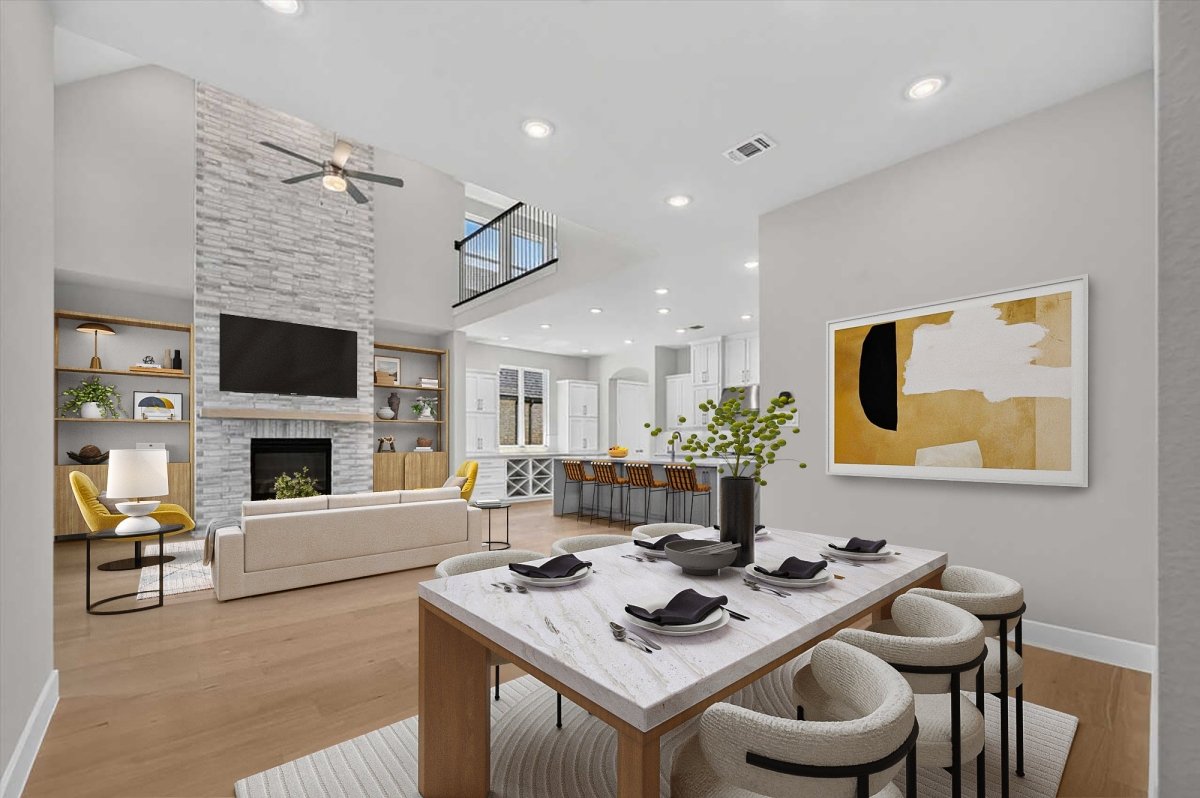
You can walk through homes online today with 3D walkthroughs and 360° virtual tours on listing sites like Zillow and Redfin, on builders' model-home pages, on house-plan sites that offer interactive 360° tours, and in video home-tour series on YouTube and Netflix. In person, a "walk-through" usually means a showing, an open house, or the buyer's final walk-through before closing to confirm the home's condition.
At Bella Virtual Staging, our designers stage 360° virtual tours so buyers walk through furnished rooms instead of empty ones. Every image is made by human designers, never AI.
What does "walk through homes" mean?
Walking through a home means moving room by room to judge layout, space, light and condition, either in person or online.
People use the phrase in two ways. The first is touring homes you might buy or build: you might explore listings on Zillow, step through a builder's model home online, or schedule an in-person showing with an agent. Either way, the walk-through tells you whether the home's layout and style fit the way you live.
The second meaning is the final walk-through. Realtor.com describes it as a brief check of the property shortly before closing, usually within 24 hours of signing, to confirm the home is in the condition you agreed to buy and that any promised repairs were made. It is not a second inspection.
How is a walk-through different from a home inspection?
A walk-through is something the buyer does to see the home; a home inspection is a professional's visual review of the home's structure and major systems. Both matter, at different points in the purchase.
Step |
Who does it |
When |
What it covers |
|---|---|---|---|
Walk-through or showing |
Buyer, often with an agent, in person or online |
While you are deciding whether to make an offer |
Layout, space, light, style and obvious condition |
Home inspection |
An independent home inspector |
As soon as you have chosen a home |
Structure, exterior, roofing, plumbing, electrical, heating and air conditioning, interiors, ventilation and insulation, fireplaces |
Final walk-through |
Buyer and buyer's agent |
Shortly before closing, usually within 24 hours |
Condition unchanged, agreed repairs done, included items still there |
NAR's buyer handout lists the nine areas an inspector should evaluate, including checking for adequate insulation and ventilation in the attic. Rocket Mortgage says inspections typically take 2 to 4 hours. The Consumer Financial Protection Bureau advises scheduling the inspection as soon as you have chosen a home and notes that you may be able to negotiate repairs with the seller, or cancel if your contract is contingent on a satisfactory inspection. An online walkthrough helps you decide which homes deserve that next step.
Where can you walk through homes online?
There are several places to begin an online walkthrough, from the big listing portals to builder websites and home-tour shows.
Listing sites: Zillow and Redfin
Zillow's 3D Home app is a free iOS and Android tool that lets agents capture a virtual tour with a supported phone or a 360-degree camera; a compatible 360 camera is required for the interactive floor plan. Once the tour link is on the MLS, Zillow says it syndicates to most major real estate sites. Zillow also reports that active listings with a 3D Home interactive floor plan drew on average 43% more page views, 47% more shares and 49% more saves than similar nearby listings without one, and that 80% of buyers agree a dynamic floor plan showing where each photo was taken would help them decide whether a home is right for them.
Redfin's guide states that all Redfin-listed homes include a 3D walkthrough home tour powered by Matterport, with 24/7 access and the ability to measure dimensions such as window heights. Buyers can explore every room from the comfort of their own home and save in-person visits for the homes they love. For more on how agents use these tours, see our guide to virtual tours in real estate.
Builder model homes and 3D house plans
National builders such as KB Home put a 360° tour on their plan pages, so you can walk through the great room, kitchen and bedrooms of a designed model online. KB Home also lets buyers book a private in-person tour of a move-in ready home using contactless entry, without a sales counselor present.
If you are planning a custom home, Architectural Designs has an Interactive 360° Tours collection of house plans you can step through before anything is built. That is one of the easiest places to find 3D walkthrough house plans and explore all the ways a layout could work for you.
Home tour videos and TV
Architectural Digest's Open Door series on YouTube tours celebrity homes in a polished, guided style, which is ideal for design inspiration even if you are not in the market. Netflix has carried house-tour series such as Amazing Interiors and The World's Most Extraordinary Homes, though availability varies by country. These videos follow a set path rather than letting you choose where to stop and look, so they are a way to explore possibilities and learn about style, not a replacement for an interactive tour.
What kinds of virtual walkthroughs are there?
Not every virtual walkthrough works the same way. Here is how the main formats compare:
Format |
How it is made |
What you can do |
|---|---|---|
360° virtual tour |
Panoramas from a 360° camera, linked by hotspots |
Look around each room and click to the next; share by link or embed on a website |
3D walkthrough / digital twin |
3D scan (for example Matterport) that captures depth |
Glide between rooms, use a dollhouse view, measure walls and windows |
Video walkthrough |
Agent-filmed video walking through the home |
Watch a guided path; no free movement, but it shows the flow from room to room |
Interactive floor plan |
2D or 3D floor plan linked to photos or panoramas |
See how rooms connect and where each photo was taken |
Virtually staged tour |
A designer adds furniture and decor to the 360° photos |
Envision how an empty space could live, with style and scale in context |
Each format serves a different need. A 3D walkthrough lets buyers measure whether their couch will fit. A video walkthrough shows the flow the way a person would walk it. A virtually staged tour helps buyers see past empty walls and picture real life in the space. In NAR's 2025 Profile of Home Staging, 83% of buyers' agents said staging made it easier for a buyer to envision the property as their future home.
How do you make a virtual walkthrough of a house?
You build a virtual walkthrough in six steps, starting with the physical space and ending with publishing it wherever buyers search.
Prepare each room. Declutter, open the blinds and turn on the lights so the camera captures the space at its best.
Shoot a 360° photo in every main room and hallway. Use a 360° camera on a tripod, placed near the center of each room, and keep the camera at the same height throughout. For help choosing one, see our guide to the best 360 cameras for real estate.
Build the tour in virtual tour software and add hotspots. Upload the panoramas, set the start point and link the rooms together. Compare platforms in our roundup of real estate virtual tour software.
Add a floor plan. A 2D or 3D floor plan shows how the kitchen connects to the great room and where the bedrooms sit.
Stage empty rooms. Vacant rooms feel smaller and colder on screen. Bella offers 360° virtual tour staging at $99 USD per tour setup plus $37 per staged 360° photo, works with any 360 camera, and has real designers furnish each panorama so buyers walk through a furnished home.
Publish the tour link. Add it to the MLS virtual tour field, embed it on your website, and share it on Facebook and other social channels; if you also film a video walkthrough, post it to YouTube. Label staged images so buyers know what they are seeing.
Are virtually staged walkthroughs allowed on listings?
Yes. Virtually staged walkthroughs are allowed as long as they are disclosed and do not mislead buyers.
NAR Code of Ethics Article 12 says REALTORS® "shall be honest and truthful in their real estate communications and shall present a true picture in their advertising, marketing, and other representations." Standard of Practice 12-10 extends that duty to internet content and images and prohibits "use of misleading images." For labeling tips, see our guide on how to disclose virtual staging.
In California, Business and Professions Code section 10140.8, added by AB 723 and in effect since January 1, 2026, requires a statement that a digitally altered image has been altered, plus a link to the original, unaltered image. It covers images changed with photo editing software or artificial intelligence to add, remove or change elements such as furniture, flooring, walls or views; routine fixes like lighting, color correction and cropping are excluded.
Rules vary by MLS, state and province, so check your local rulebook and brokerage policy before uploading media. Canadian agents can start with our guide to virtual staging rules in Canada. Bella adds furniture and decor only, never structural changes, and gives disclosure guidance with every order.
How should buyers use an online walkthrough?
A virtual walkthrough is most useful when you treat it like an in-person visit: room by room, with a clear idea of what you need to learn.
Start with the floor plan. Understand the layout before you begin clicking through rooms, and check whether the home's flow fits your life.
Follow the tour in the order you would walk the home. Entry, living room, kitchen, bedrooms, bathrooms: this helps you feel the home's real flow.
Use measure tools where they exist. Check whether your sectional fits the great room and whether the bedroom walls can take your bed.
Note what a screen cannot show. Noise, smell, the street and natural light at different times of day are things a tour can't capture, so write down questions for the visit.
Schedule an in-person appointment for the homes you love. A virtual walkthrough is a strong filter, but it should not be the end of your research. Walk the home, check the finish on counters and floors, and listen to the neighborhood before you make an offer.
Frequently asked questions
What is a walkthrough for a house?
A walkthrough is a tour of a property, in person or online, to explore each room and judge its condition, layout and style. Before closing, the final walk-through is a brief check, usually within 24 hours of signing, to confirm the home's condition and that agreed repairs were completed. It is not a second inspection.
How do you make a virtual walk-through of a house?
You need a 360° camera on a tripod, virtual tour software to link the rooms with hotspots, and a floor plan so buyers can see the layout. Optional virtual staging fills empty rooms with designer furniture and decor, making the space easy to envision as a home.
Where can I find 3D walkthrough house plans?
House-plan sites such as Architectural Designs' Interactive 360° Tours collection let you step through plans before anything is built. National builders like KB Home also put 360° tours on their model-home and plan pages.
Is there a house tour show on Netflix?
Yes. Netflix has carried series such as Amazing Interiors and The World's Most Extraordinary Homes, though availability varies by country. Architectural Digest's Open Door on YouTube is another popular option and is free to watch.
Can you walk through a home without an agent?
Online, yes: 3D tours on listing sites let you explore properties around the clock. Some builders, including KB Home, let you book a self-guided tour of a move-in ready home, while resale showings are usually arranged through an agent or an open house.
Does Bella use AI to stage virtual tours?
No. Human designers stage every 360° photo, matching the furniture and decor to each room's light and scale, and every order comes with disclosure guidance so agents can label the images correctly on the MLS.