April 15, 2026 · Zoe Jovic
The Best Architectural Rendering Software in 2026: A Comprehensive Guide
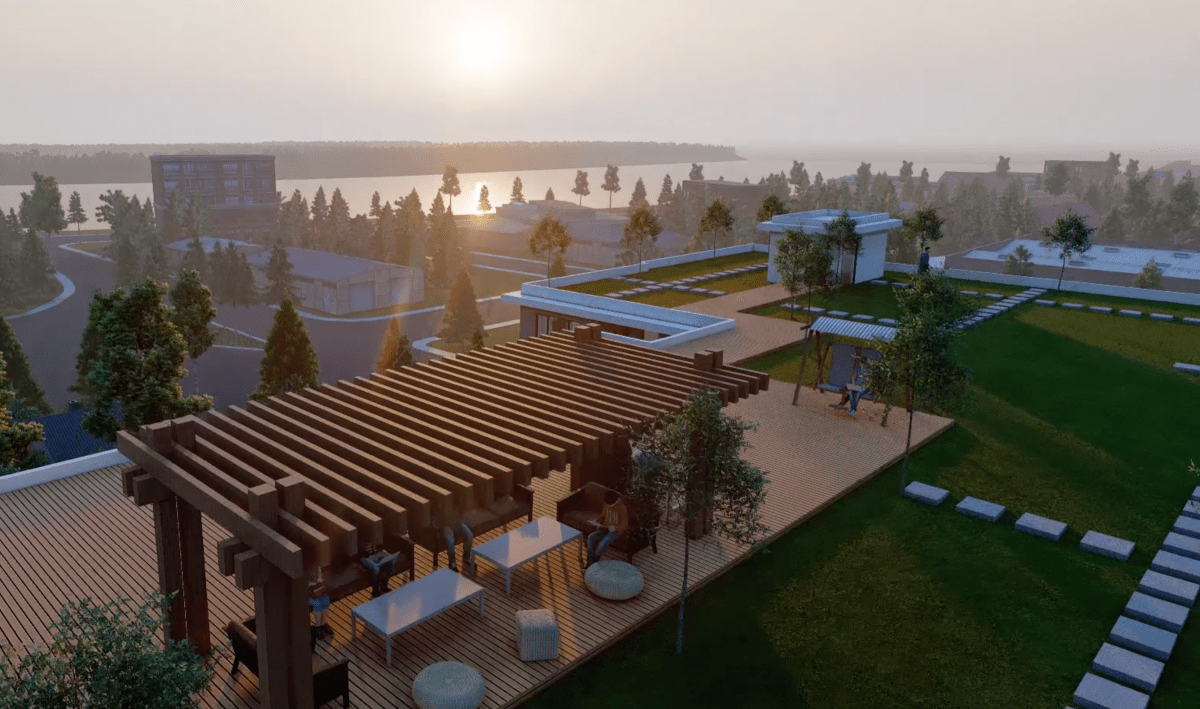
Quick answer: The best architectural rendering software in 2026 depends on the job. For maximum photorealism, professionals pair a modeling tool such as 3ds Max, SketchUp or Revit with an offline render engine like V-Ray or Corona. For fast design reviews and client walkthroughs, real-time rendering software such as Enscape, Lumion, Twinmotion or D5 Render is quicker to learn. Blender is the strongest completely free option.
Most studios use more than one tool: a modeling program to build the geometry, a render engine to calculate light and materials, and Photoshop for post-production. This guide compares the main architectural rendering software options, explains real-time vs. offline rendering, and covers free tools, hardware, AI tools and when it makes more sense to outsource.

Architectural Rendering Software Comparison (2026)
| Software | Type | Best for | Learning curve | License |
|---|---|---|---|---|
| 3ds Max | Modeling + rendering host | High end marketing visuals, complex scenes | Steep | Paid |
| SketchUp | Modeling | Concept models, early visualization | Easy | Paid; SketchUp Free for non-commercial use |
| Revit | BIM modeling | Architecture projects built in BIM | Steep | Paid |
| V-Ray | Render engine (offline + GPU) | Photoreal stills, granular control | Steep | Paid |
| Corona Renderer | Render engine (offline) | Photoreal interiors and exteriors | Moderate | Paid |
| Enscape | Real-time plugin | Live design reviews inside Revit, SketchUp, Rhino | Easy | Paid |
| Lumion | Real-time, standalone | Fast visuals, landscapes, animations | Easy | Paid |
| Twinmotion | Real-time, standalone | Quick walkthroughs from Revit and Archicad | Easy | Free under $1M revenue; paid seats above |
| D5 Render | Real-time ray tracing | Fast, high quality visuals from SketchUp and others | Easy | Free tier + paid plans |
| Unreal Engine | Real-time engine | Interactive walkthroughs, VR | Steep | See Epic's license terms |
| Blender | Modeling + rendering | Completely free all-in-one workflow | Steep | Free, open source |
License notes come from each vendor's own page. Twinmotion is free for individuals and businesses with under $1 million USD in revenue in the past 12 months, and $445 per seat per year above that (Epic Games, Twinmotion licensing). SketchUp Free runs in a web browser and is not for commercial use (SketchUp Help). D5 Render lists a free tier alongside paid plans (D5 pricing). Check current terms before you buy — vendors change them often.
How Architectural Rendering Software Works
Architectural rendering software simulates light, shadows, materials and reflections in a digital scene, then calculates a final image from a chosen camera. Producing one rendered image usually involves three kinds of software tools:
- Modeling software builds the geometry — walls, roofs, windows, furniture. 3ds Max, SketchUp, Revit, Rhino and Blender are the common modeling tools in architecture.
- A render engine is the rendering layer that turns the model into an image. Some (V-Ray, Corona) are plugins inside the modeler; others (Lumion, Twinmotion, D5 Render) are separate programs that import the model.
- Post-production in Photoshop adjusts color, contrast and atmosphere, and adds final touches such as people or sky.
Understanding this split matters because "best rendering software" questions often compare tools that do different jobs. V-Ray is not an alternative to SketchUp; it runs inside it.
Key Criteria for Choosing Architectural Rendering Tools
- Render quality and realism. For client presentations and real estate marketing, the render engine decides how convincing materials, lighting and reflections look. Offline engines give the most control over the final image.
- Speed and real-time capability. Real-time visualization lets you change a material and see it instantly — ideal for design reviews and creative exploration.
- Compatibility and BIM interoperability. The software should work with your CAD and BIM tools (Revit, AutoCAD, SketchUp, Rhino, Archicad) and common file formats such as .dwg, .fbx and .obj. Poor interoperability forces rework every time the design changes.
- Learning curve. An intuitive interface gets occasional users productive quickly. Tools with granular control, like V-Ray or Unreal Engine, take longer to master but reward advanced users.
- Asset libraries. Built-in furniture, vegetation, people and materials save hours on every project.
- Hardware requirements. Real-time tools and GPU rendering depend on a strong graphics card. Check the vendor's recommended specs before committing.
- Cost and licensing. Free tools, subscriptions and revenue-based licenses all exist — the right choice depends on firm size and how often you render.

Best Architectural Rendering Software for Photorealism
3ds Max
Autodesk 3ds Max is the long-standing standard for high end marketing visuals in architectural visualization. It handles complex scenes and detailed environments, and it hosts render engines such as V-Ray, Corona and Arnold. The learning curve is steep, but for final images where every material and light matters, it offers the most creative control. It remains a core tool in many professional archviz studios.
V-Ray
V-Ray, from Chaos, is a render engine rather than a modeler. It plugs into 3ds Max, SketchUp, Revit, Rhino and other hosts, and it supports both CPU rendering and GPU rendering. It is known for precise control over lighting and materials, which makes it a favorite for photoreal stills. That control comes with more settings to learn.
Corona Renderer
Corona, also from Chaos, is a CPU-based renderer for 3ds Max and Cinema 4D that many interior visualization artists choose for realistic lighting with simpler setup than V-Ray. It is a strong option when image quality matters more than real-time speed.
Revit and SketchUp as starting points
Revit is the BIM tool many architecture firms design in, and SketchUp is the most approachable modeler for concept work. Neither is a high-end renderer on its own, but both connect to real-time rendering software and render engines, so the model you already have becomes the base for your visuals.
Best Real-Time Rendering Software
Real-time rendering software draws the image as fast as you move the camera, using modern GPU hardware and, increasingly, real-time ray tracing. It trades a little granular control for speed, which makes it ideal for design ideas, client walkthroughs and quick iterations.
Enscape
Enscape runs inside Revit, SketchUp, Rhino and Archicad with a live connection, so changes in the design model update the render instantly. It is one of the easiest ways for architects to add real-time visualization and VR walkthroughs to an existing workflow.
Lumion
Lumion is a standalone real-time tool with an extensive library of materials, plants and objects, and it is especially strong on landscapes and animations. You can produce stunning visuals with just a few clicks, though with less granular control than an offline engine.
Twinmotion
Twinmotion, from Epic Games, is built on Unreal Engine technology and imports directly from Revit and Archicad. It is quick to learn, and its revenue-based license makes it free for many small firms, freelancers and architecture students.
D5 Render
D5 Render offers real-time ray tracing with live sync to SketchUp and other modelers. It has become a popular choice for small studios that want high quality visual output without long render times.
Unreal Engine
Unreal Engine is a full game engine used for interactive walkthroughs, configurators and VR. It delivers dynamic lighting and highly interactive experiences, but it has a steep learning curve and is usually used by dedicated visualization teams.
Free Architectural Rendering Software
- Blender — completely free and open source, with modeling, materials, animation and two built-in render engines (Cycles for ray-traced realism and Eevee for real-time). The learning curve is steep, but it can produce professional results.
- SketchUp Free — a browser-based version of SketchUp for learning and personal projects. It is not licensed for commercial use.
- Twinmotion — free for individuals and small businesses under $1 million USD in annual revenue, educational institutions and students.
- D5 Render — has a free tier with a smaller asset library than its paid plans.
- Sweet Home 3D — a free, simple interior layout tool. Useful for furniture placement and space planning, but limited for architectural rendering.
Free tools are a good starting point for architecture students and occasional users. For client work, check the license: some free versions do not allow commercial use.

Real-Time vs. Offline Rendering
| Real-time rendering | Offline (traditional render engines) | |
|---|---|---|
| Speed | Instant preview, fast exports | Minutes to hours per final image |
| Control | Less granular control | Full control over light, materials and post processing |
| Best for | Design reviews, walkthroughs, early visualization | Marketing stills, print, pre-sale campaigns |
| Examples | Enscape, Lumion, Twinmotion, D5 Render, Unreal Engine | V-Ray, Corona, Arnold, Blender Cycles |
Many firms use both: real-time workflows during design, and an offline engine for the final rendering that goes on the billboard or listing.
GPU Rendering, CPU Rendering and Cloud Rendering
- GPU rendering uses the graphics card and is much faster for most scenes. Very large scenes can exceed the card's memory (VRAM), which is the main limit.
- CPU rendering uses the processor and system RAM. It is slower but handles huge, complex scenes reliably.
- Cloud rendering sends frames to remote servers so your workstation stays free. It is useful for animations and deadline peaks. Check data security terms before uploading confidential client projects.
Hardware Requirements
Architectural rendering is computationally heavy. A practical workstation has a dedicated, recent graphics card with plenty of VRAM (essential for real-time tools and GPU rendering), a multi-core CPU, generous RAM and fast SSD storage. Requirements vary by software and scene size, so compare each vendor's recommended specifications with the complexity of your typical architecture projects.
AI Tools in Architectural Visualization
AI tools now appear inside many rendering programs — for upscaling, denoising, generating textures, and turning sketches into quick mood images. They are useful for early design ideas. They are not yet reliable for final marketing visuals, because they do not consistently reproduce a specific building's dimensions, specified materials and site, image after image. That is why professional studios still model and light each scene by hand for anything a buyer or planning board relies on.

Which Software Fits Your Firm?
- Large firms and large-scale projects need scalable tools with network or cloud rendering and strong BIM interoperability. 3ds Max with V-Ray or Corona for final images, plus Enscape or Twinmotion for design reviews, is a common combination.
- Small firms and freelancers usually prioritize a short learning curve and fast output. Lumion, Enscape, Twinmotion and D5 Render let a small team produce high quality visuals without a dedicated visualization artist.
- Architecture students can start with Blender, SketchUp Free and the free tiers of Twinmotion and D5 Render, then learn an offline engine once the fundamentals are in place.
- Interior designers and landscape designers benefit most from large asset libraries: Lumion and D5 Render for landscapes, and V-Ray or Corona for detailed interiors.
When to Outsource Instead of Buying Software
Software is only part of the cost. Photoreal architectural visualization also needs hardware, asset libraries and, above all, an artist's time and experience with lighting and materials. If you need renders a few times a year, outsourcing is often cheaper than licenses plus training.
Bella Virtual Staging's human 3D artists work in tools such as 3ds Max, SketchUp and Revit and finish images in Photoshop — renders are never AI-generated — for clients across the US and Canada. Prices are per finished image (USD): residential interior $550, commercial interior $700, single-building exterior $750, streetscape or aerial $1,000, multi-building $1,400, and 3D floor plans from $70. Orders of 3+ renders get 5% off, 6+ get 10%, 11+ get 15% and 21+ get 20%. See our 3D rendering services, or read the full architectural rendering cost guide.
Frequently Asked Questions
What software do architects use for rendering?
Architects most often model in Revit, SketchUp, Rhino or 3ds Max, then render with a real-time tool such as Enscape, Lumion, Twinmotion or D5 Render, or an offline engine such as V-Ray or Corona for final marketing images.
What is the best rendering engine for photorealism?
V-Ray and Corona are the most widely used for photoreal architectural stills because they offer detailed control over lighting and materials. The engine is only part of it — lighting, materials and post-processing skill matter just as much.
What is the best free architectural rendering software?
Blender is the most capable completely free option. Twinmotion is free for individuals and businesses under $1 million USD in annual revenue, and D5 Render offers a free tier. SketchUp Free is good for learning but not licensed for commercial use.
Can I use free software for professional renderings?
Yes, if the license allows commercial use. Blender does, and Twinmotion does for eligible small businesses. SketchUp Free does not.
Is real-time rendering good enough for marketing?
For many listings and presentations, yes — real-time ray tracing has closed much of the gap. For print, billboards and pre-sale campaigns, most studios still use an offline engine for the final image.
How long does it take to learn rendering software?
Real-time tools such as Lumion, Enscape and Twinmotion can be picked up in weeks. Offline engines like V-Ray and full engines like Unreal Engine take much longer to master, especially lighting and material setup.
Is it cheaper to buy rendering software or hire a studio?
If you render regularly and have staff time to learn, software pays off. If you need a handful of high-end images per project, a studio is usually cheaper once you count licenses, hardware and learning time.
Related Reading
- Architectural rendering cost in 2026
- Architectural rendering 101: definitions, uses and why it matters
- How to create architectural renderings in Photoshop
- House rendering: a beginner's guide
Need finished visuals rather than software? Order a render or request a quote.