August 29, 2026 · Zoe Jovic
Virtual Staging Program: The 2026 Guide for Real Estate Agents
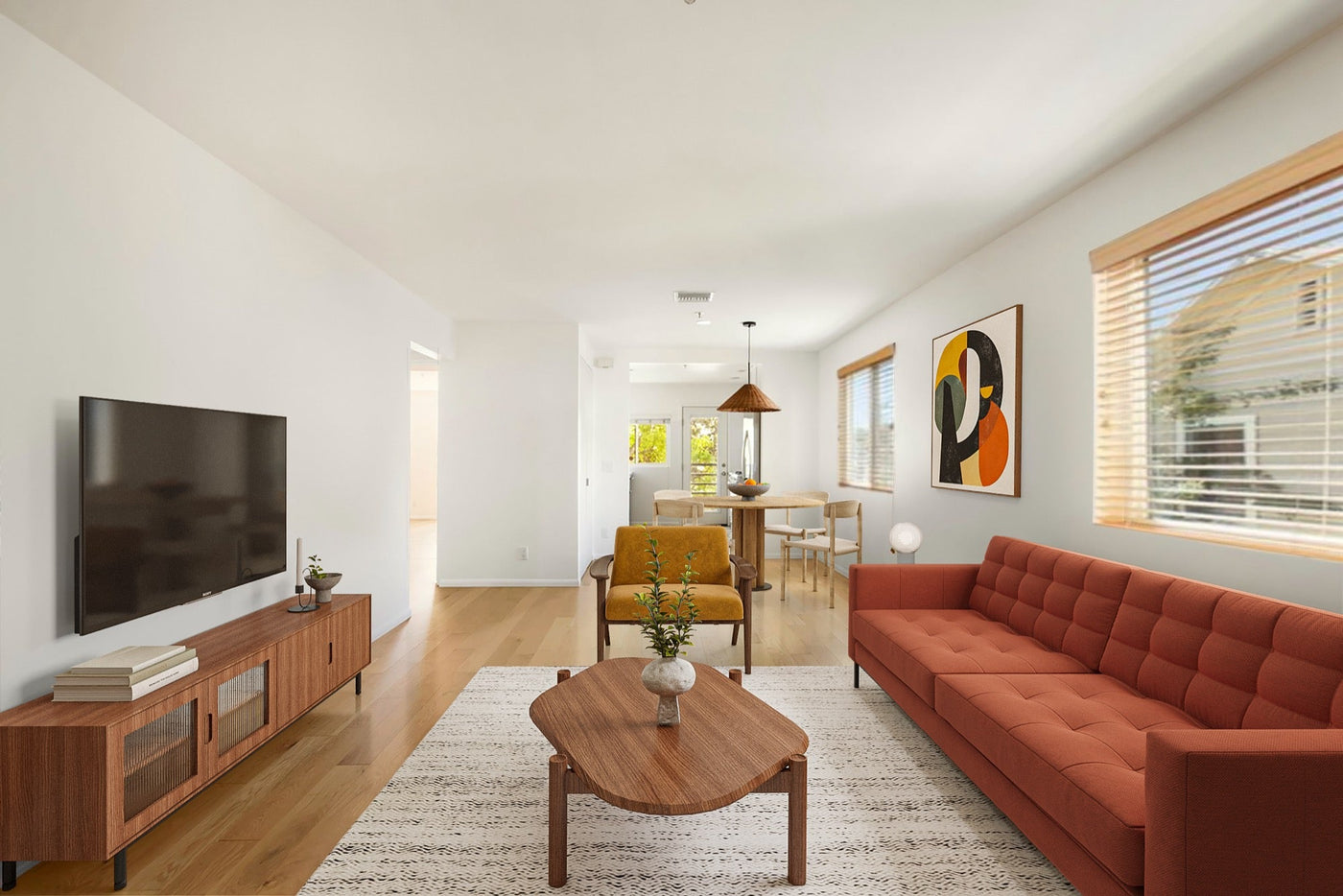
A virtual staging program is a digital tool that adds furniture and decor to photos of empty rooms, turning a blank space into a fully styled interior without moving a single piece of real furniture. The software analyzes room dimensions and lighting, then places realistic furniture, adjusts shadows, and applies design themes — in some tools in seconds, in others through a professional designer who edits the image by hand.
In 2026 this matters more than ever. Borrowing costs remain elevated, inventory is climbing in many U.S. markets, and buyers are more selective about which listings they click on Zillow, Redfin, and Realtor.com. First impressions happen on a screen. According to the 2025 NAR Profile of Home Staging, 83% of buyer's agents say staging makes it easier for a buyer to envision a property as their future home. Real estate agents use virtual staging to create marketing photos that earn that click in a crowded feed.
Modern virtual staging software offers AI virtual staging, furniture removal, and one click design application, which makes the technology practical even for a solo agent with no design background. Here is why agents are adopting it:
- Speed: stage an entire listing in hours, not days
- Cost: virtual staging costs roughly $20 to $70 per photo, against $400 to $2,400 per room per month for traditional physical staging
- Flexibility: generate multiple custom style versions of the same room to attract buyers across demographics
Virtual staging has moved from novelty to standard practice in the real estate industry, and this guide covers what a virtual staging program actually does, the features that separate good tools from mediocre ones, what everything costs, the MLS and California disclosure rules you have to follow in 2026, and how to decide between a DIY AI app and a done-for-you service.
Why virtual staging programs are a game-changer for real estate agents
Your listing photo is the first thing potential buyers see, and it directly determines whether they schedule a showing or scroll past. Staged property images consistently outperform empty room shots on click-through and time on market.
The NAR data backs this up. Staging the living room ranks most important (37% of buyer's agents), followed by the primary bedroom (34%) and the kitchen (23%). Nearly half of seller's agents — 49% — reported that staging reduced a home's time on market, and 29% reported staged homes drew offers 1% to 10% higher in dollar value — a higher price for the same property. Virtual staging improves online engagement with property listings by giving buyers a furnished vision of what is otherwise an empty room.


Physical staging means renting furniture, hiring movers, and coordinating schedules — typically $400 to $2,400 per room per month with 5 to 7 days of lead time. Human virtual staging, where a designer edits the image, runs $30 to $80 per photo with staged images typically delivered within 24 to 48 hours. AI powered virtual staging drops that to roughly $0.20 to $7 per image in about 10 seconds. The difference in turnaround time alone changes how fast you can get listings live.
Different real estate professionals benefit in different ways:
- Listing agents: stage multiple listings at once without logistics headaches
- Buyer's agents: help clients visualize a future home when viewing empty or cluttered spaces
- Property managers: market vacant rental units with styled photos instead of bare walls
- Investors flipping 3 to 5 homes per quarter: eliminate repeated physical staging costs across projects
- Real estate photographers: add staging as a margin line item on shoots you are already doing
The final images can be used for MLS listings and marketing materials, social media ads, and print brochures — all from the same staged photo set.
Core features to look for in an AI virtual staging program
Not every virtual staging solution offers the same quality or tools. Before committing to a subscription, use this checklist to compare what matters most for your real estate marketing workflow.
Essential capabilities
- Furniture removal and clutter removal from existing photos
- The ability to remove existing furniture and replace it with new pieces in one pass
- Style libraries with options like modern, Scandinavian, farmhouse, luxury, and mid-century
- Consistent design themes applied across all photos of a listing, so your staged images match room to room
AI-powered features that separate good tools from mediocre ones
- Automatic perspective alignment, so furniture lines up with walls and floor angles
- Realistic shadows and reflections that mimic actual light sources
- Lighting adjustment for dark rooms or inconsistent color temperature
- Preservation of architectural details: moldings, windows, and baseboards remain intact
Image and platform specs
- Support for high-resolution JPEGs and PNGs in standard MLS aspect ratios (3:2, 4:3)
- Portrait and landscape modes
- Compatibility with upload requirements for MLS systems, Zillow, Airbnb, and Vrbo
Ease of use
- One click presets and a drag and drop editor for non-technical staff
- Batch processing for agents handling multiple listings
- Browser-based access with no software install, or dedicated virtual staging apps
The one nobody checks until it is too late: revisions. A tool that renders in 10 seconds is not fast if the sofa lands halfway through a wall and there is no way to say so. Ask what happens when an image comes back wrong, and whether a human ever looks at it.
How AI-powered virtual staging works behind the scenes
Virtual staging software analyzes room dimensions and lighting before placing a single piece of furniture. The underlying technology combines computer vision (detecting walls, floors, windows, and doors) with semantic segmentation (distinguishing existing furniture from permanent structures) and generative models that render new decor.
The basic workflow:
- Upload: select a high-quality listing photo and upload it to your staging tool
- Detect and remove: the AI identifies the room geometry and any unwanted objects or existing furniture, then removes them
- Style and render: choose a design style from the furniture library, and the tool places realistic furniture with scale, shadows, and lighting
- Review and download: inspect the output, adjust if needed, and export in MLS ready resolution
AI virtual staging tools can render an image in about 10 seconds. Early tools from 2022 produced obvious artifacts — floating rugs, warped chair legs, mismatched lighting. Modern AI staging systems have reduced these issues through better neural network architectures and larger training datasets, and at their best they produce stunning visuals that hold up at full MLS resolution.
They have not eliminated them. Where AI still struggles is exactly where listings are hardest: rooms with mixed light sources, sloped ceilings, dark basements, reflective surfaces, and unusual geometry. That is the gap a designer-reviewed workflow closes, and it is the reason the two approaches coexist rather than one replacing the other.
Key use cases: from vacant homes to tenant-occupied listings
Virtual staging programs shine where physical staging is impractical, expensive, or impossible.
Vacant new construction condos: developers can pre-stage units virtually before construction finishes, helping buyers see a furnished vision and accelerate sales of pre-sale inventory. No need to furnish model units across every floor plan. This is the core of virtual staging for home builders.
Tenant-occupied listings: when a tenant's existing furniture or clutter distracts from the space, furniture removal and replacement clears the room digitally and applies a fresh, neutral style. The tenant never moves a thing.
Inherited or distressed properties: empty spaces with dated finishes benefit from staging that shows potential buyers what the home could look like furnished. Where the finishes themselves are the problem, virtual renovation updates flooring, cabinetry, and paint in the image.
Multiple style versions: generate a modern version and a traditional version of the same room, then A/B test which staged photo drives more buyer interest on social media ads.
Short-term rental hosts: Airbnb and Vrbo hosts use AI powered virtual staging to test décor concepts digitally before committing money to real furniture, which gives them more creative control over the rental's look without upfront risk.


Step-by-step: running your first virtual staging project
You can complete your first virtual staging project in under an hour.
- Choose a virtual staging program that fits your budget and volume — see the cost comparison below
- Select 3 to 5 high-quality property photos, prioritizing the living room, primary bedroom, and kitchen
- Upload and confirm the room type — most tools auto-detect, but confirming improves accuracy
- Choose a design style from the furniture library based on your target buyer's style preferences
- Run furniture removal if the room has unwanted objects or dated pieces
- Apply design and let the tool render the scene
- Review details — check for artifacts around walls, windows, and floor edges
- Export in MLS ready resolution and download
Photo best practices for better results
- Shoot at eye level, not from extreme angles
- Use natural daylight whenever possible
- Avoid ultra-wide lens distortion — it confuses AI perspective detection
- Tidy the room before shooting, even if you plan to remove clutter digitally
Organizing your outputs
- Name files by address, room, and style, for example 123-Main-LR-modern-staged.jpg
- Upload both the original and the virtually staged photo to your listing gallery
- Add a clear caption for MLS compliance: "Virtually staged. Original space is unfurnished."
Compliance and ethics: MLS rules for virtually staged listing photos
MLS compliance is not optional. Most MLSs require disclosure for virtually staged photos, and violations can result in corrective action or listing removal. Buyers should be told images are digitally staged so expectations are set before they walk through the door.
Common 2024 to 2026 MLS policies include:
- Mandatory disclosure when any listing photo is virtually staged
- No alteration of permanent features — removing structural defects, changing window views, or misrepresenting room size
- Truthful representation of the space: adding furniture is allowed, adding a lake view is not
Board-specific examples
- Stellar MLS (Florida) requires a flag in the photo description, a checkbox, and public remarks stating "One or more photo(s) was virtually staged"
- CRMLS (California) requires the original unaltered photo uploaded next to the staged version
- ARMLS (Arizona) uses the Flexmls digitally altered disclosure with the original uploaded before or after the staged image
California's AB 723 changed this from an MLS rule into state law. Assembly Bill 723 took effect on January 1, 2026. A California listing that uses significantly altered images must publish the original, unaltered image alongside the altered one, with a disclosure identifying which images were modified — labelled with language such as "digitally altered" or "virtually staged." Minor photographic adjustments like brightness and color correction are exempt. CRMLS guidance confirms that AI-generated staging counts as a digitally altered image, and that as of publication non-compliance triggers a compliance contact rather than a fine, with fining policy under review.
Check your own local MLS handbook and brokerage policy before publishing AI-staged property images. Rules vary by board, and California is unlikely to be the last state to legislate on this.
Every image Bella Virtual delivers is built to be disclosed. We never alter permanent features, and we return the original file alongside the staged one so you can meet AB 723 and MLS side-by-side requirements without extra work.
Cost comparison: virtual staging programs vs. traditional options
The economics of virtual staging versus physical staging are not close. A solo agent handling 3 listings a month with 4 rooms each has 12 photos to stage. Physical staging at even $400 per room runs $4,800 monthly before logistics. The same 12 photos cost $444 with a professional virtual staging service, or under $85 with a DIY AI tool.
Here is how the options compare:
| Option | Pricing model | Cost | Turnaround | Human review |
|---|---|---|---|---|
| Bella Virtual — Virtual Staging | Per photo, no subscription | $37 per photo | 24–48 hours | Yes — designer-staged |
| Bella Virtual — Furniture Removal & Staging | Per photo, no subscription | $39 per photo | 24–48 hours | Yes — designer-staged |
| Collov AI | Subscription | From $16/month | Seconds | No |
| REimagineHome | Subscription | From $19/month | Seconds | No |
| Remodel AI | Subscription | $29/month, unlimited designs | Seconds | No |
| Trolto | Subscription | From $59/month | Seconds | No |
| Apply Design | Per photo | $7 per photo | Minutes | No |
| Virtual Staging AI | Per photo | $24 per photo, cheapest paid tier | Seconds | No |
| Traditional physical staging | Per room, per month | $400–$2,400 per room | 5–7 days | Yes — in person |
Third-party pricing is as advertised by each vendor and moves often — verify before you buy. Remodel AI offers free designs with no watermark, which is a genuine free option for agents who want to test at an affordable price point before committing. Note that Apply Design can take over 10 minutes per photo, so factor turnaround time into your evaluation alongside cost.
Two things the table cannot show. First, subscription pricing is only cheap at volume: a $19/month plan across two listings a month is not half the price of a per-photo service, it is roughly the same. Second, the cost that actually hurts is a re-shoot or a relisting, not a staging fee.
AI program or human virtual staging? How to choose
This is the real decision, and the honest answer is that it depends on what the photo has to do.
Choose a DIY AI virtual staging program when you are testing concepts, staging a rental you manage yourself, producing social media content, or working through simple, well-lit, square rooms at high volume. Instant results and a low monthly fee are exactly right for that job, and you keep complete creative control over every iteration.
Choose human virtual staging services when the photo is going on the MLS for a listing you are accountable for. A designer catches the scale error the model does not, matches furniture style to the neighbourhood's buyer, keeps the design theme consistent across all eight photos of a listing, and takes responsibility when something is wrong. For a $500,000 listing, the difference between $85 and $444 of staging is not a meaningful line item — the difference in whether the photos look credible is.
Plenty of agents use both: an AI app for quick internal mockups and a professional service for the images that go live. That is a reasonable workflow, not a contradiction.
Bella Virtual sits deliberately on the designer-edited side. Real interior designers stage every image, orders come back in 24 to 48 hours, pricing is per photo with no subscription or minimum, and we serve real estate professionals across the United States and Canada. See full pricing or browse the portfolio of real listings.


Choosing the right virtual staging program for your business
Picking the right virtual staging software comes down to matching the tool to your workflow. The evaluation criteria that matter most for real estate agents and small brokerages:
- Image quality and realism: does the output look like a real estate photographer shot it, or does the realistic furniture float above the floor?
- Turnaround time: instant results versus hours matters when you are racing to get listings live
- Ease of use: can non-technical staff — admins, junior agents — use it without training?
- MLS compliance features: does the tool return the original file, and can it label disclosure?
- Revision policy: what happens when an image comes back wrong, and what does a fix cost?
- Customer support: responsive help when you are on a deadline
Some tools include extras like floor plan generation, renovation previews, and AI copywriting for listing descriptions — features that extend your marketing package beyond the staged photo.
Test with one or two real listing photos across multiple tools. Stock images will not reveal how a tool handles tricky spaces like basements, oddly shaped living areas, or rooms with challenging lighting.
For brokerages, consider multi-user access, shared libraries of design presets, and centralized billing. Interior designers on your team may want different style preferences than your listing agents, and a good platform accommodates both. Photographers reselling staging should look at partner pricing rather than paying retail per image.
Future trends: where AI virtual staging is heading after 2026
Today's virtual staging tools are a preview of what is coming.
Interactive experiences: 3D walkthroughs where buyers swap furniture styles in real time, and AR overlays that let buyers see staged furniture through their phones during a property tour.
Smarter style suggestions: AI that analyzes local buyer behavior and recommends which staging style converts best in your specific market — what works in Seattle differs from Miami.
Deeper integrations: virtual staging programs connecting directly with CRM systems, lead-gen platforms, and marketing suites, removing the manual export-and-upload step.
Better photorealism: generative improvements will handle difficult lighting such as dusk shots and backlighting, and reduce artifacts in vacant rooms with unusual geometry.
More regulation: AB 723 is the first state law of its kind, and disclosure requirements are likely to spread. Building the habit of publishing the original alongside the staged image now costs nothing and will save a scramble later.
FAQ: common questions about virtual staging programs
Can buyers tell if a listing photo is virtually staged? With good tools and good input photos, most buyers cannot distinguish a well-staged image from a photo of a physically furnished room. Poor-quality tools or bad source photos produce noticeable artifacts. Either way, you should disclose it.
Is AI virtual staging allowed on my MLS? Virtually all MLS boards allow virtually staged photos, but most require disclosure, and several require the original photo uploaded alongside the staged version. In California, AB 723 makes the side-by-side original a legal requirement, not just a board rule.
How long does it take to stage a full set of photos? A DIY AI tool renders a single image in about 10 seconds, so a listing of 8 to 10 photos takes a few minutes. Designer-edited virtual staging services take 24 to 48 hours.
How much does virtual staging cost per photo? DIY AI apps run from about $0.20 to $7 per image, usually via subscription. Professional, designer-staged services run $30 to $80 per photo. Bella Virtual charges $37 per photo with no subscription or minimum order.
Do I still need physical staging for luxury properties? In many luxury markets buyers expect to walk into a physically staged home. Virtual staging works well for the online marketing that gets them to the door, but may not fully replace physical staging for high-end occupied homes.
What is the cheapest way to try virtual staging? Several AI tools offer a free tier or free trial designs — enough to test quality on your own property photos before committing money.
Can I use virtually staged photos on Airbnb and Vrbo? Yes. Many short-term rental hosts do. Disclose that the images are virtually staged so guests are not misled.
Does virtual staging actually help sell faster? Staging helps: 49% of seller's agents in NAR's 2025 report saw a decrease in time on market, and 29% saw offers 1% to 10% higher. Better photos drive more showings, and more showings shorten days on market. Be sceptical of anyone quoting a precise "sells X% faster" figure for virtual staging specifically — that number does not exist in credible research.
Start with one room
The simplest way to evaluate any virtual staging program is to run one of your actual listing photos through it today. Pick a vacant room from your current inventory, stage it, and compare the result against the empty shot. The difference will speak for itself.
If you would rather have a designer do it, upload a photo to Bella Virtual — $37 per photo, staged by real interior designers, back in 24 to 48 hours, MLS-compliant and delivered with the original file.