Sign In


What Is 3D Rendering?
Bella VirtualShare
3D rendering is the process of turning a 3D model or scene into a finished 2D image. Think of it as the moment a digital design stops being a wireframe and starts looking like a photograph. A computer takes the geometry, materials, lighting, and camera angle you've set up. Then it calculates how all of that would look in the real world. The output? A single rendered image, or a sequence of them for animation, that reads as believable to the human eye.
We do this every day at Bella Virtual. Our designers build a space, dress it, light it, and render it, so an empty listing can feel like a home. But before the pretty pictures, it helps to know what's actually happening under the hood.
How does 3D rendering work?
3D rendering works by simulating light. The software follows virtual rays as they leave a light source, bounce off surfaces, pass through glass, and finally reach the camera. Then it translates all of that into colored pixels. That's the short version. The longer version is a chain of steps, and every one of them matters.
First comes the 3D model. Someone builds the geometry, the polygon mesh that defines every wall, every chair leg, every curve of a sofa, inside 3D modeling software. Then texture and material work. A flat surface becomes wood, brushed metal, or worn leather through texture mapping and reflectance values. Then the lighting. Each light source gets a position, a color, an intensity. Why fuss over it? Because light is what sells realism. Last comes the render itself, where a rendering engine crunches the math and produces the final image.
The authoritative definition is refreshingly plain. As the Wikipedia article on rendering puts it, "Rendering is the process of generating an image from input data such as 3D models." Short. But it covers the whole craft.
What is the difference between 3D modeling and rendering?
3D modeling is building the object; 3D rendering is photographing it. Two distinct stages of the same pipeline, and people mix them up constantly. Modeling is the sculpting phase. You shape the 3D geometry, define the 3D space, and arrange the 3D objects in a 3D scene. Nothing is photorealistic yet. It's closer to a wire-frame model, or a gray clay shape.
Rendering is the final step. It takes that finished 3D model and generates a 2D image from it, applying the textures, the light, and the camera. So modeling and rendering are partners, not synonyms. You can't render an empty scene, and a model with no render is just data sitting on a hard drive. The Blender manual sums up the second half nicely: "Rendering is the process of turning a 3D scene into a 2D image."
What is the 3D rendering process, step by step?
The 3D rendering process involves four core stages: modeling, texturing, lighting, and the render. Here's how creating 3D imagery usually unfolds in a studio like ours.
- Model. A 3D artist builds the geometry in 3D modeling software, creating 3D models from blueprints, reference photos, or a CAD file. These are the bones of the scene.
- Texture. Surfaces get materials. Texture mapping wraps a wood grain, a fabric weave, or a coat of paint around bare geometry so it stops looking like plastic.
- Light. Designers place each light source and tune global illumination until shadows fall the way they would at golden hour. Lighting is where a render either feels real or feels fake.
- Render. The rendering engine simulates how light interacts with every surface, then outputs the photorealistic image. It's the final step, and the one that eats the most computing power.
Skip any stage and the result suffers. Proper rendering leans on the three steps that came before it.
What is ray tracing?
Ray tracing is a rendering technique that traces the path of light through a scene to produce highly realistic images. Rather than guess how light behaves, it follows individual rays as they reflect, refract, and scatter. According to Wikipedia, "ray tracing is a technique for modeling light transport for use in a wide variety of rendering algorithms for generating digital images." That's why it produces such convincing reflections, soft shadows, and caustics through glass.
It's one of several rendering methods. Path tracing builds on it. Physically based rendering uses similar ideas to make materials respond to light the way real materials do. The trade-off? Ray tracing is slow. Higher fidelity costs longer rendering times, which brings us to offline versus real-time work.
When should you use real-time versus offline rendering?
Use real-time rendering when speed matters and offline rendering when image quality matters most. Real-time rendering generates frames instantly, which is how video games, virtual reality, and interactive 3D walkthroughs stay responsive. The graphics processing unit does the heavy lifting. So you can move through a 3D space and the picture updates as you go.
Offline rendering takes a different path. It spends seconds, minutes, sometimes hours on a single frame to reach the highest realism. Film visual effects and high-end architectural rendering rely on it. For a still hero shot of a staged living room? Offline wins every time. For a 3D virtual tour someone clicks through, real-time 3D is the answer. Different jobs, different tools.
How is 3D rendering used in real estate?
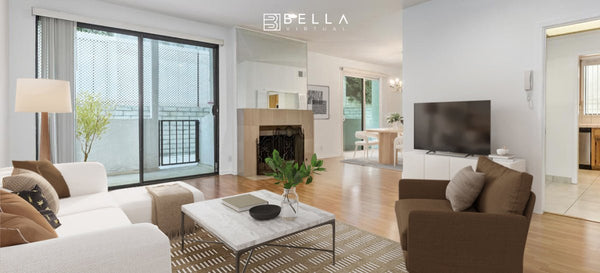
In real estate, 3D rendering is used to create photorealistic images of spaces that don't exist yet, or sit empty right now. A builder can market a development before the foundation is poured. A seller can show a vacant room fully furnished. That's the heart of 3D visualization for property: selling the feeling of a finished home before it's finished.
The applications stretch well past listings. Product design teams render prototypes. Marketing teams swap traditional photography for 3D imagery. Interior design studios test palettes before a single can of paint is opened. At Bella Virtual, our 3D rendering service for architectural visualization turns plans and floor plans into images buyers can actually picture themselves in. And every frame is hand-crafted by real interior designers, never AI-generated. The software is a tool. The eye behind it is human.
What 3D rendering software do professionals use?
Professionals use 3D rendering software like Autodesk 3ds Max, Blender, and dedicated rendering engines to model, texture, light, and render their scenes. Each program has its strengths. Some handle 3D modeling and rendering in one package; others specialize in fast, realistic rendering or 3D animation.
Software alone doesn't make a good render, though. The right 3D result comes from a skilled artist making hundreds of small decisions about composition, color, and light. We build our work in 3ds Max and Photoshop, the same professional-grade tools the visual effects and product design worlds rely on. Specialized software gets you the photorealistic image. Experience gets you one worth looking at.
Frequently asked questions
How much do 3D renderings cost?
The cost of 3D rendering depends on the complexity of the scene, the number of images, the level of photorealism, and how fast you need them. A single simple still costs far less than a detailed animated sequence with custom modeling. Most studios quote per image or per project rather than a flat rate. For an accurate number, share your floor plans and reference photos and ask for a tailored quote.
Is 3D rendering difficult to learn?
3D rendering has a real learning curve, but the basics are approachable. A beginner can produce a simple rendered image in a few weeks using free 3D modeling software like Blender. Reaching professional, photorealistic quality takes years, because lighting, materials, and composition are as much art as technique. Most people learn modeling first, then texturing, then rendering.
How long does 3D rendering take?
Rendering a single high-quality image can take anywhere from a few minutes to several hours, depending on the scene and the hardware. Real-time rendering is near-instant, while offline rendering with advanced rendering techniques like ray tracing is slower because it simulates light in far more detail. Faster rendering usually means trading away some realism, so studios balance speed against quality for each project.
What is a rendering engine?
A rendering engine is the software component that performs the actual calculation, turning a 3D model into a finished 2D image. It reads the geometry, materials, and lights, then simulates how light travels to generate the picture. Different engines use different rendering methods, from real-time approaches built for speed to physically based rendering built for realism.